About this animation
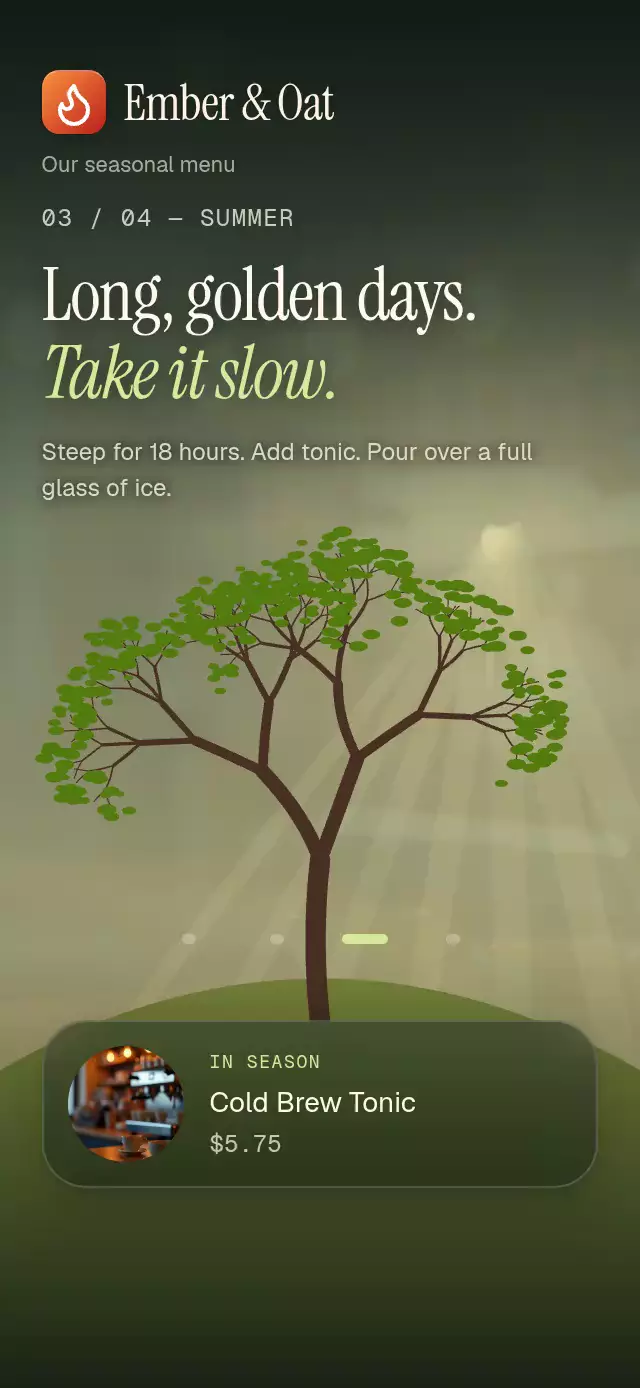
A scroll-driven seasonal tree with growing blossoms and falling leaves, with configurable chapter content, action label, and fonts.
Why this one
The setting stays recognizable throughout the year instead of replacing a menu photo every season. Snow follows the upper edges of actual branches, and falling leaves remain on the hill. Both effects reverse naturally when you scroll backward. The Ember & Oat demo pairs the tree with a seasonal café menu and a working full-menu button.
How it works
- Generate recursive branch geometry and 400 branch-tip particles once with seed 170.
- Measure the component with
onLayout; each viewport height is one chapter. - Derive one continuous progress
p, from 0 to 3, fromuseAnimatedScrollHandlerandscrollY. Skia paths, sky, hill light, snow thickness, and seasonal colors follow it on the UI thread. - Rest around chapter centers (20% on each side), then use smoothstep for bloom and leaf-fall poses. Leaves follow individual delayed paths with sinusoidal wind and settle at the foot of the tree.
- Stack atmospheric photos with entry-only opacity. Add dark top/bottom veils and nonoverlapping headline windows: entry
(p - (c - 0.52)) / 0.4, exit(p - (c + 0.14)) / 0.28. - Programmatic travel drives
scrollTo, so autoplay and touch use the same scroll-derived state. The demo clock starts its winter-to-spring transition immediately, advances every 2.6 seconds with a 2.2-second(0.77, 0, 0.175, 1)move, and resets behind a black fade. Touch permanently stops the current autoplay session.
Install
npx expo install @shopify/react-native-skia@2.14.0 expo-blur@~58.0.5 expo-image@~58.0.17 expo-linear-gradient@~58.0.3 react-native-reanimated@4.7.1 react-native-worklets@0.13.0Copy this folder, excluding demo/, into your project. Follow the installed Skia version's web setup and load CanvasKit before rendering this component on web (for example, a lazy component under WithSkiaWeb). Supply fonts from your host app; the core has no dependency on catalog fonts or demo assets. Icons: Lucide (ISC); copied paths are in icons.ts.
Usage
import FourSeasonsTreeScroll from './four-seasons-tree-scroll';

<FourSeasonsTreeScroll onMenuPress={() => openMenu()} />;
Customize the four chapter objects and typography:
import { useRef } from 'react';
import {
  FourSeasonsTreeScroll,
  type FourSeasonsTreeScrollRef,
} from './four-seasons-tree-scroll';

const story = useRef<FourSeasonsTreeScrollRef>(null);

<FourSeasonsTreeScroll
  ref={story}
  chapters={seasonalChapters}
  menuTitle="The year in four cups"
  ctaLabel="Browse the menu"
  fontFamily="YourInterfaceFont"
  serifFontFamily="YourSerifFont"
  italicFontFamily="YourItalicFont"
  monoFontFamily="YourMonoFont"
  onMenuPress={() => openMenu()}
  onChapterChange={(chapter) => trackSeason(chapter)}
/>;

story.current?.scrollToChapter(1, 2200);
story.current?.reset();
seasonalChapters is a four-item tuple of SeasonChapter: season, title, subtitle, description, drink, price, accent, optional image and optional background. Images accept React Native image sources. Load local assets before the story starts.
Props
| Prop | Type | Default | Description |
|---|---|---|---|
| chapters | readonly four-item SeasonChapter tuple | Generic seasonal copy | Text, accents, menu photos, atmospheric backgrounds |
| header | ReactNode | — | Optional brand lockup |
| menuTitle | string | A seasonal story | Header caption |
| ctaLabel | string | Explore the menu | Final button text and accessibility label |
| onMenuPress | () => void | — | Final button action |
| onChapterChange | (chapter: number) => void | — | Chapter callback, on the RN thread |
| onInteraction | () => void | — | Stop host autoplay when touched or dragged |
| fontFamily | string | System | Interface text |
| serifFontFamily | string | System | First headline line |
| italicFontFamily | string | System italic | Accent headline line |
| monoFontFamily | string | System | Chapter counter and prices |
| snapToChapters | boolean | true | Snap on native platforms only |
| style | StyleProp<ViewStyle> | — | Root layout overrides |
| testID | string | — | Root test identifier |
duration | number | 900 | Scroll hint half-cycle in milliseconds. Spring physics and reduced-motion timing are unchanged. |
chapters | readonly [ SeasonChapter, SeasonChapter, SeasonChapter, SeasonChapter, ] | DEFAULT_CHAPTERS | Four seasonal chapters, in winter-to-fall order. |
header | ReactNode | undefined | Optional header, such as a brand lockup. |
menuTitle | string | 'A seasonal story' | Label above the seasonal story. |
ctaLabel | string | 'Explore the menu' | Final button label. |
onMenuPress | () => void | undefined | Final button action. |
onChapterChange | ( chapter: number, ) => void | undefined | Called on chapter changes on the React Native thread. |
onInteraction | () => void | undefined | Called when a touch or drag stops demo playback. |
fontFamily | string | undefined | Interface font; falls back to the system font. |
serifFontFamily | string | undefined | Editorial headline font. |
italicFontFamily | string | undefined | Italic headline font. |
monoFontFamily | string | undefined | Chapter counter font. |
snapToChapters | boolean | true | Enable chapter snap on native platforms. |
style | StyleProp<ViewStyle> | undefined | Outer layout overrides. |
testID | string | undefined | Root test identifier. |
Ref methods: scrollToChapter(chapter, duration = 1000) clamps to 0–3; reset() returns to winter behind a 220 ms black fade, then reveals over 450 ms. The autoplay clock is confined to the demo.
Compatibility
Expo SDK 58, React Native 0.88.0, Reanimated 4.7.1, Worklets 0.13.0, Skia 2.14.0. Intended for iOS, Android, and web, including SDK-compatible Expo Go. Native Android blur uses BlurTargetView with dimezisBlurViewSdk31Plus; older Android versions retain the tinted glass fallback.
This folder does not register itself in the host catalog; load Skia lazily when adding it there.
Accessibility
Each active chapter exposes a heading, description, drink, and price; inactive chapters are hidden from screen readers. Four labeled chapter buttons provide a touch alternative to scrolling, with selected states and 44 pt hit areas. The final CTA is inside scroll content and has a button role and label. The demo's menu has a labeled close button and Android back support.
Reduced motion uses discrete chapters with 200 ms transitions, no headline movement or falling snow, and instant programmatic scrolling. There is no parallax, zoom, or velocity trail. Button scale feedback stays subtle at 0.97. Layout uses the component's own dimensions and reserves the upper-right corner for the host viewer's close control.
Customization notes
Set chapters[].accent to theme the seasonal headings and navigation.