About this animation
A snowfall overlay that settles on rounded surfaces and scatters on fast scroll, with configurable content, colors, density, and wind.
Why this one
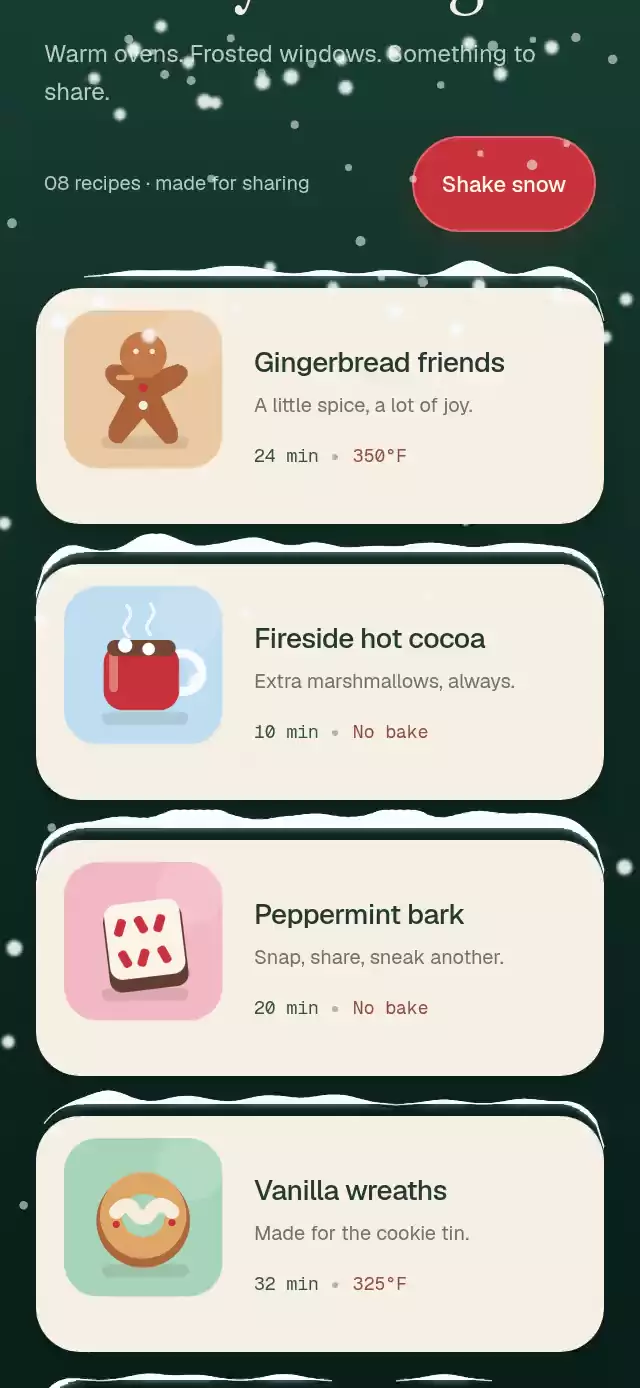
Falling snow becomes part of the interface: measured card edges catch flakes, a sculpted snowcap grows from each collision, and scroll momentum breaks it into powder. Slow scrolling carries the snow along with the card.
How it works
- Wrap the screen with
SnowSettleOverlayand each card withSnowSurface. Layout and scroll events trigger UI-thread measurements relative to the overlay. - One fixed particle pool drives parallax snowfall, lateral drift, and an eight-second wind cycle. Arrays and particle records are reused.
- Each rounded edge owns a profile sampled every four points. Collisions add a smooth mound to neighboring columns, capped by
maxPileHeight. - Skia draws the cool undershadow, irregular cream snowcap, corner overhang, and fine upper highlight in one transparent, touch-through Canvas.
useSnowScroll()measures scroll velocity. Above the threshold, snow releases into gravity-driven particles and its remaining profile clears in 300 ms. The shared budget limits emitted powder; a full pool skips additional emissions.- Physics and drawing run in worklets, without React updates per frame. Registration also stays on the UI thread. The demo shares the same Canvas for all eight recipe illustrations.
Install
npx expo install @shopify/react-native-skia react-native-reanimated react-native-workletsUse Expo SDK 58 and its compatible package versions. Reanimated needs the worklets Babel transform (configured by babel-preset-expo). Skia web needs CanvasKit loaded before rendering the component; see the Skia web setup.
Usage
The hook must run in a child of the overlay. Use Animated.ScrollView, not the React Native ScrollView, and leave removeClippedSubviews disabled so mounted surface measurements remain available.
import { View, Text } from 'react-native';
import Animated from 'react-native-reanimated';
import { SnowSettleOverlay, SnowSurface, useSnowScroll } from './snow-settle-overlay';

function Cards() {
  const onScroll = useSnowScroll();
  return (
    <Animated.ScrollView onScroll={onScroll} scrollEventThrottle={16}>
      <SnowSurface borderRadius={24} style={{ margin: 20 }}>
        <View style={{ padding: 24, borderRadius: 24, backgroundColor: '#173D31' }}>
          <Text style={{ color: '#F6EFE3' }}>Something warm to share</Text>
        </View>
      </SnowSurface>
    </Animated.ScrollView>
  );
}

export default function Screen() {
  return (
    <SnowSettleOverlay>
      <Cards />
    </SnowSettleOverlay>
  );
}
Custom personality and external controls:
const snow = useRef<SnowSettleOverlayRef>(null);

<SnowSettleOverlay
  ref={snow}
  density={55}
  maxParticles={180}
  wind={-12}
  maxPileHeight={7}
  shakeVelocity={1100}
  shakeOnDoubleTap
  colors={{ flake: '#FFFFFF', pile: '#F8FBFF', shadow: '#8EAEC8', highlight: '#FFFFFF' }}
>
  <Cards />
</SnowSettleOverlay>

// Call from your own accessible button or seasonal settings.
snow.current?.shake();
snow.current?.reset();
Import useRef from React and type SnowSettleOverlayRef from the piece for the controls example.
Props
| Prop | Type | Default | Purpose |
|---|---|---|---|
children | ReactNode | required | Your screen. |
density | number | 70 | Falling flakes; limited by the pool size. |
wind | number | 9 | Signed lateral drift in pt/s. |
maxPileHeight | number | 9 | Maximum snowcap height in points. |
colors | Partial<SnowColors> | cool white palette | Flake, pile, shadow, and highlight colors. |
enabled | boolean | true | Enables snowfall, accumulation, and snow drawing. |
shakeVelocity | number | 900 | Scroll release threshold in pt/s. |
shakeOnDoubleTap | boolean | false | Enables a stationary double-tap shortcut. |
maxParticles | number | 220 | Total pool size, clamped to 0–220. Reserve slots above density for powder. |
surfaceArtwork | readonly { id: string; content: ReactNode }[] | absent | Optional decorative Skia nodes in surface-local coordinates. No text or images are built into the reusable overlay. |
style | StyleProp<ViewStyle> | flex: 1 | Container layout. |
testID | string | snow-settle-overlay | Root identifier. |
SnowSurface accepts children, optional unique id, borderRadius (22), style, and testID. Match its radius to the card. Put margins on the wrapper and padding on the inner card, so its measured top matches the visible card edge. Changing dimensions resizes the height profile; unmounting removes the surface.
The ref exposes shake() and reset(). These remain available when the optional double tap is disabled. useSnowScroll() returns the animated handler directly.
Integration and limits
The overlay fills its parent, including a small embedded container, and clips to that rectangle. The host screen supplies safe-area insets. Use one vertical scroll view per overlay, with its viewport matching the overlay; keep a scrolling header inside that view, as in the demo. Independently clipped nested scroll views, virtualized/recycled cells, rotated cards, and continuously animated card transforms need application-specific registration/clip handling. Measurements refresh after layout, resizing, and every delivered scroll, rather than continuously measuring static cards.
All colors are replaceable. The component contains no fonts, brand, copy, external assets, network requests, or theme imports. The demo alone loads the catalog typography and an invented recipe brand. surfaceArtwork is a decorative artwork slot: it remains visible with snowfall disabled and is hidden from assistive technology. Place meaningful content in the native card children.
Compatibility
Target versions: Expo SDK 58, React Native 0.88.0, Reanimated 4.7.1, react-native-worklets 0.13.0, and Skia 2.14.0. These libraries are included in the matching Expo Go release. No extra native dependency is required.
iOS, Android, and web are implementation targets.
Accessibility
The snow layer ignores all pointer events and is hidden from VoiceOver and TalkBack. Card content remains accessible. The system's reduced-motion setting (including changes while mounted) stops physics and hides all snow; enabled={false} does the same. No snowfall or accumulation is used as a status indicator. Double tap is optional and does not claim the responder; an accessible host button calling shake() offers the same action. The demo provides a 48-point button and stops automatic scrolling under reduced motion.