About this animation
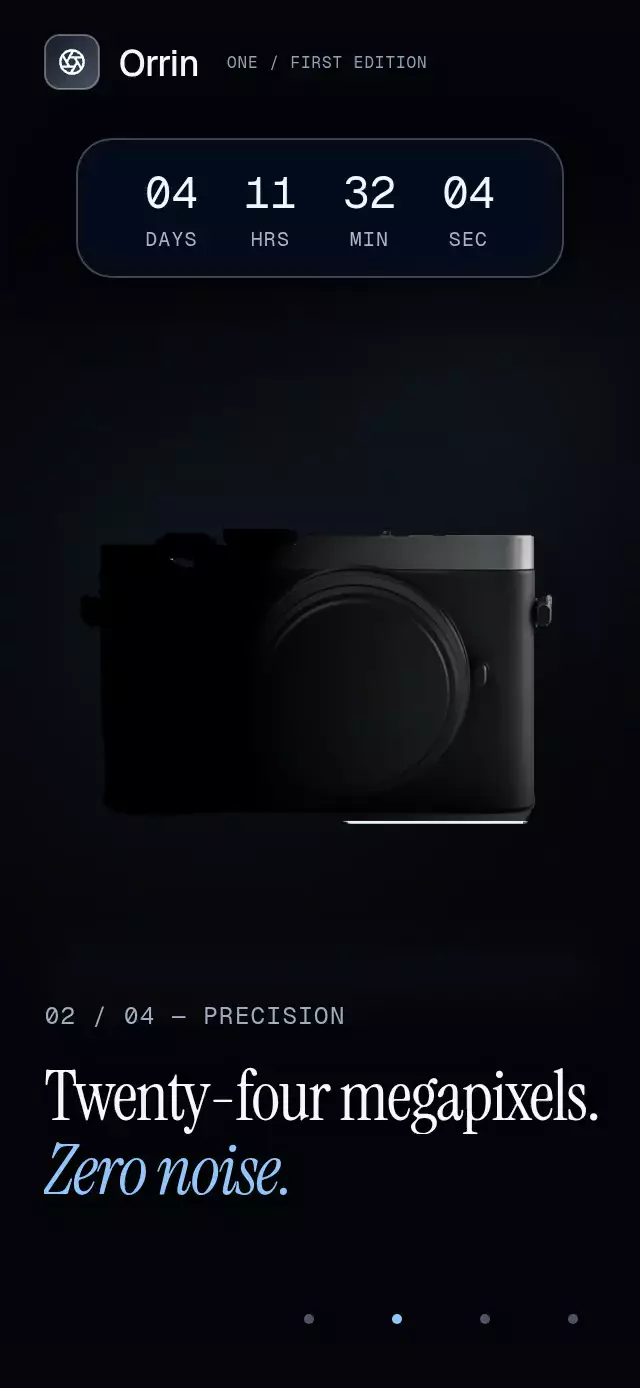
A product launch story with a countdown-to-reservation transition and configurable product image, chapters, fonts, and accent color.
Why this one
A static launch photo gives away the product immediately. This story draws only its silhouette first, reveals the lens with side light, then illuminates the top plate. A fading floor reflection and three cascading studio lights finish the reveal. Every product highlight stays inside the image’s alpha mask.
How it works
- Measure the host with
onLayout; the product is centered at 50% width and 46% height. - Derive one continuous chapter progress from
useAnimatedScrollHandler. Smoothstep poses rest within 20% of each chapter. - Tint four image copies displaced by 1.5 points, subtract their interior with a black image, and reveal the remaining rim with an angular alpha mask.
- Stack radial side lighting, top lighting, and full illumination over the black silhouette. Reflect the image vertically with an alpha fade.
- Keep editorial text in disjoint entry/exit windows. The glass countdown stays inside the scroll content and expands into the final action.
- Advance the scroll through the imperative ref. The demo holds the first silhouette for three seconds, advances every 2.6 seconds, then resets through black. Touch stops autoplay.
Install
npx expo install @shopify/react-native-skia expo-blur react-native-reanimated react-native-workletsUse the SDK-compatible versions in piece.json. Load CanvasKit before mounting this component on web (for example, use Skia’s WithSkiaWeb boundary). Load custom fonts once in your host app. Supply an alpha-cutout product image; an opaque background prevents the silhouette effect.
Usage
import { LaunchCountdownReveal, type LaunchChapter } from './launch-countdown-reveal';

const chapters: [LaunchChapter, LaunchChapter, LaunchChapter, LaunchChapter] = [
  { title: 'A new perspective.', subtitle: 'Coming into focus.', eyebrow: 'INTRODUCTION' },
  { title: '24 megapixels.', subtitle: 'Capture every detail.', eyebrow: 'PRECISION' },
  { title: '212 grams.', subtitle: 'Carry less.', eyebrow: 'CRAFT' },
  { title: 'Meet the camera.', subtitle: 'Make it yours.', eyebrow: 'LAUNCH' },
];

<LaunchCountdownReveal
  productSource={require('./camera.png')}
  chapters={chapters}
  launchAt={Date.now() + 388928000}
  onReserve={() => openReservation()}
/>
For a different light treatment and external control:
const launchRef = useRef<LaunchCountdownRevealRef>(null);

<LaunchCountdownReveal
  ref={launchRef}
  productSource={require('./camera.png')}
  chapters={chapters}
  launchAt={deadline}
  accentColor="#A5B4FC"
  productWidth={0.78}
  transitionDuration={900}
  reserveLabel="Join the launch"
  fontFamily="YourInterfaceFont"
  titleFontFamily="YourSerifFont"
  italicFontFamily="YourItalicSerifFont"
  monoFontFamily="YourMonoFont"
/>
// From an event handler:
launchRef.current?.goTo(2);
Import the ref type from this folder. goTo(chapter, duration?) selects chapters 0–3, stop() interrupts the current programmatic scroll, and reset() fades through black and restarts the rim reveal. Autoplay belongs to the host, not the component.
Props
| Prop | Type | Default | Purpose |
|---|---|---|---|
productSource | DataSourceParam | required | Transparent local product image |
chapters | four LaunchChapter objects | required | Titles, subtitles, and editorial labels |
launchAt | number | required | Absolute deadline, milliseconds since Unix epoch |
reserveLabel | string | Reserve yours | Final button label and accessible name |
onReserve | () => void | — | Reservation action |
onChapterChange | (chapter: number) => void | — | Nearest chapter callback on the JS thread |
onInteraction | () => void | — | Touch/drag notification for stopping autoplay |
brand | ReactNode | — | Host branding in the upper left |
fontFamily | string | system | Interface font |
titleFontFamily | string | system | Headline font |
italicFontFamily | string | system italic | Accent line font |
monoFontFamily | string | system | Tabular countdown and chapter label font |
accentColor | string | #93C5FD | Cold studio light and italic accent |
productWidth | number | 0.82 | Product width relative to the container |
transitionDuration | number | 1100 | Programmatic scroll duration in milliseconds |
snapToChapters | boolean | true | Native snapping; always disabled on web |
style | StyleProp<ViewStyle> | — | Host sizing and styling |
testID | string | — | Test identifier |
Compatibility
Targets Expo SDK 58, React Native 0.88.0, Reanimated 4.7.1, Worklets 0.13.0, Skia 2.14.0, and Expo Blur 58. Uses BlurTargetView for Android background sampling. Works with the installed Expo Go modules; custom native dependency changes require a development build.
Supports iOS, Android, and web. Register this Skia demo through the host’s deferred Skia loader.
Accessibility
Headlines have header roles; inactive chapters are hidden from screen readers. Four labeled 44-point chapter controls provide a touch alternative to scrolling. The live countdown has a descriptive accessible label without an intrusive live region. The final CTA has a button role and the reservation label. Reduced motion removes drift, parallax, product zoom, the sweeping flash, and rolling translation; text and chapter transitions use 200 ms fades.
Icons: Lucide (ISC). The demo uses the Orrin brand and aperture glyph from the project kit. All product imagery is bundled locally.