About this animation
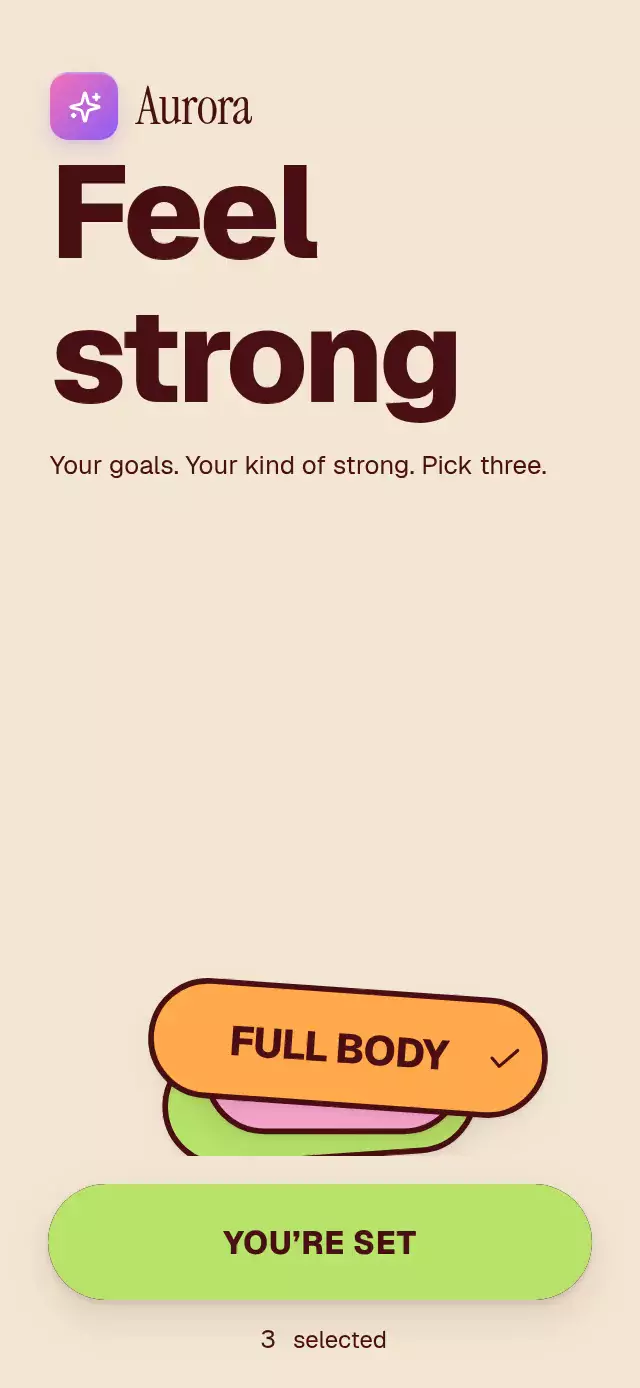
A selectable goal marquee that gathers chosen pills into a summary, with configurable goals, copy, accent color, and fonts.
Why this one
A conventional goal picker is a static chip grid. Here, dragging a lane adds momentum, vertical scrolling energizes the wall, and every selection pauses its lane for a half-second. Confirmation gathers the actual selected pill surfaces into a small stack. No photographs, remote assets, or real sports identities are involved.
How it works
- Each lane owns one continuous displacement shared value. A UI-thread frame callback adds its 18–30 pt/s drift and exponentially decaying gesture velocity.
- Repeated copies wrap outside the visible viewport with a constant 12 pt gutter. Horizontal pan wins over a pill's tap; vertical movement remains available to the page.
- Selection changes React state once per action. Separate UI-thread values handle pressure, the critically damped 1.08 selection scale, rotating check, and three-point border.
- The selected count animates to an exact integer; neighboring numerals fade out. Once the required count is reached, the button surface fills from the left.
- A single confirmation progress captures each pill's launch position and gathers the nearest copy of each selected goal into a stack. Other copies fade away. A new selection or reset interrupts confirmation and cancels its callback.
- Short containers scroll the heading and wall while keeping the confirmation button in its own footer. The host supplies safe-area padding.
Install
npx expo install expo-image react-native-gesture-handler react-native-reanimated react-native-workletsValidated dependency versions: Expo Image ~58.0.17, Gesture Handler ~3.3.0, Reanimated 4.7.1, Worklets 0.13.0. React and React Native come from the host project. Follow the host project's Reanimated setup and wrap its root in GestureHandlerRootView. No Skia setup is needed. The included demo additionally uses expo-linear-gradient and the catalog's loaded fonts.
Usage
import { MarqueeGoalPills } from './marquee-goal-pills';

const goals = [
  { id: 'cardio', label: 'CARDIO', color: '#B7E36B', textColor: '#4A0F14' },
  { id: 'core', label: 'CORE', color: '#F7A6CF', textColor: '#4A0F14' },
  { id: 'mobility', label: 'MOBILITY', color: '#1F5E4A', textColor: '#BFF2D9' },
];

export function GoalScreen() {
  return <MarqueeGoalPills goals={goals} onSubmit={(ids) => saveGoals(ids)} />;
}
Use a ref and palette props for a darker, quieter variant:
const picker = useRef<MarqueeGoalPillsRef>(null);

<MarqueeGoalPills
  ref={picker}
  goals={goals}
  rows={3}
  maxSelected={2}
  speed={0.7}
  title={'Find your\nnext move'}
  backgroundColor="#25151A"
  textColor="#F3E7D3"
  buttonTextColor="#25151A"
  accentColor="#8E86C9"
  fontFamily="YourInterfaceFont"
  titleFontFamily="YourDisplayFont"
  onChange={(ids) => updateDraft(ids)}
/>;

// Called from an event handler:
picker.current?.toggle('cardio');
picker.current?.submit();
picker.current?.reset();
Import useRef from React and MarqueeGoalPillsRef from this folder. Supply stable, unique goal IDs. maxSelected is the required count as well as the selection limit; it is capped to the available goals. An empty list disables confirmation. Remount the component when replacing the goal dataset or changing the selection limit.
Props
| Prop | Type | Default | Purpose |
|---|---|---|---|
goals | MarqueeGoal[] | Required | Stable ID, visible label, surface color, text color |
rows | number | 5 | Alternating lanes, capped to goal count |
maxSelected | number | 3 | Required selection count and maximum |
title | string | Choose\nyour goals | Editorial heading; accepts a newline |
description | string | Pick what moves you. | Instructions |
brand | ReactNode | — | Host-provided wordmark or brand tile |
startLabel | string | GET STARTED | Initial action label |
submitLabel | string | LET'S GO | Ready action label |
completeLabel | string | YOU’RE SET | Confirmed action label |
selectedLabel | string | selected | Counter suffix |
announce | (ids, phase) => string | English feedback | Custom announcements for change, limit, submit |
backgroundColor | string | #F3E7D3 | Page and footer surface |
textColor | string | #4A0F14 | Heading, borders, initial button surface |
buttonTextColor | string | #F3E7D3 | Initial button text |
accentColor | string | #B7E36B | Ready button fill |
fontFamily | string | System | Interface text |
titleFontFamily | string | System | Heading and pill text |
monoFontFamily | string | System | Rolling counter |
titleSize | number | 76 | Maximum heading size, fitted to width |
speed | number | 1 | Drift multiplier; zero stops ambient drift |
onChange | (ids: string[]) => void | — | Discrete selection changes |
onSubmit | (ids: string[]) => void | — | Confirmation settled, once per submission |
style | StyleProp<ViewStyle> | — | Root container |
testID | string | marquee-goal-pills | Root and control identifier prefix |
ref: toggle(id), submit(), and reset(). Repeated submit calls are ignored until reset or a selection change. No callback fires for a canceled submission.
Compatibility
Targets Expo SDK 58, React Native 0.88.0, and Reanimated 4.7.1. Uses modules bundled in Expo Go. Supports iOS, Android, and web. The component caps its content width at 600 pt and scrolls in small embeds and landscape. It applies no safe-area insets; full-screen hosts must provide them.
Accessibility
Pills expose checkbox labels and checked states; repeated decorative copies are hidden from assistive technology. The button announces its readiness and selection count. Important selection and confirmation changes receive announcements; announce localizes all feedback. Selection requires only a tap, and accessibility activation actions are provided. Pills are at least 64 pt high; the button is at least 58 pt high. With reduced motion enabled, ambient motion, gesture displacement, pill scaling, check rotation, and collection flights are removed; selection and confirmation use 200 ms fades.
Demo timeline and review notes
The Aurora demo uses the kit brand and Geist 800. Autoplay drifts for 2 seconds, selects CARDIO at 2.00 s, CORE at 2.38 s, FULL BODY at 2.76 s, and gathers them at 3.50 s; it resets every 5.80 s. Timers are canceled on unmount. The first visible selection response occurs within the first three seconds.
Code review: text uses at least 1.1× line height; the brand stays on the left and the top-right viewer close area is empty. At 390×844 the heading, five lanes, and footer fit in flow; at 320×694 the wall scrolls without overlapping the footer. Small embeds use the same scroll fallback. The button fill is the button's own clipped material, and the flight moves the pill surfaces themselves; no opaque block passes over text.
Icons: Lucide (ISC). Paths are copied from the repository kit into icons.ts. The demo uses Aurora from the kit; all goal copy and colors are supplied through props.