About this animation
Related guides
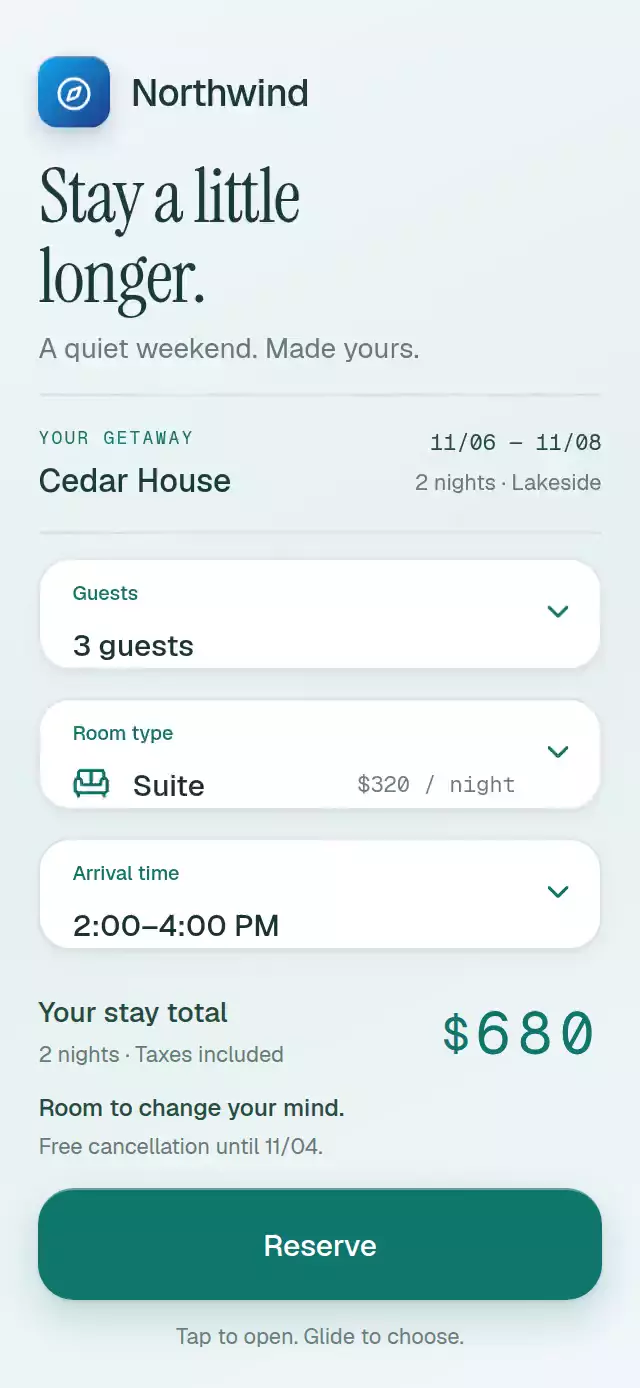
A select field that expands into an option card and returns the chosen row, with configurable options, label, accent color, and fonts.
Why this one
The surrounding form stays in context instead of disappearing under a system sheet. Drag through a continuous highlight and release to select, or tap an option. The selected row and collapsed value are the same element. Its opening anchor keeps that value aligned when space allows; a configurable cap keeps the menu inside the available space.
How it works
onLayoutmeasures the field width. A single expansion shared value drives its height, corner radius, material depth, title, chevron, and option positions.- Opening captures an offset based on the current selection. The field grows in normal layout, while optional shared offsets let neighboring content move with it.
- Rows spread outward from the original value position with a staggered reveal. A separate continuous pointer value moves the highlight under the finger.
- Gesture Handler composes a pan and a tap exclusively. Release commits an option; releasing outside the card cancels. Screen-reader activation offers the same selection without dragging.
- Selection updates React only at the commit boundary. A layout effect contracts the card after the new selected row has rendered, avoiding a duplicate value or a one-frame text swap.
- Reduced motion uses a 200 ms fade with immediate layout changes. The demo price uses independent digit columns with exact integer rest positions.
Install
npx expo install @shopify/react-native-skia react-native-gesture-handler react-native-reanimated react-native-workletsWrap the app with GestureHandlerRootView. For web, initialize CanvasKit before rendering this component (use the catalog's withSkia loader when registering the demo). These modules are available in the project's Expo Go SDK 58 environment.
Icons: Lucide (ISC). Only the bundled kit paths are used. The demo adds expo-linear-gradient for the Northwind brand tile and background.
Usage
import { MorphingSelectMenu } from './morphing-select-menu';

<MorphingSelectMenu
  label="Guests"
  options={[
    { value: 'one', label: '1 guest' },
    { value: 'two', label: '2 guests' },
  ]}
  style={{ flexGrow: 0 }}
  onChange={(option) => saveGuestCount(option.value)}
/>;
Customize the material and control it externally:
import { useRef } from 'react';
import { MorphingSelectMenu, type MorphingSelectMenuRef } from './morphing-select-menu';

function RoomField() {
  const menu = useRef<MorphingSelectMenuRef>(null);
  return (
    <MorphingSelectMenu
      ref={menu}
      label="Room type"
      colorScheme="light"
      accentColor="#0F766E"
      springDamping={30}
      maxUpwardShift={148}
      options={[
        { value: 'queen', label: 'Queen', detail: '$180 / night', icon: 'bed-single' },
        { value: 'suite', label: 'Suite', detail: '$320 / night', icon: 'sofa' },
      ]}
      style={{ flexGrow: 0 }}
    />
  );
}
The ref exposes open(), close(), hover(index), and select(index). Place an outside-touch handler on the containing screen and call close() there; field touches stop bubbling to that handler. Coordinate sibling fields with onOpenChange. The included demo shows both integrations, and a scrollable form keeps displaced content reachable.
Props
| Prop | Type | Default | Description |
|---|---|---|---|
options | readonly SelectOption[] | Required | Up to eight stable values, labels, optional details and kit icons. |
label | string | Choose an option | Field label and menu title. |
initialIndex | number | 0 | Starting selected index, clamped to the list. |
onChange | (option, index) => void | — | Called once when committed. |
onOpenChange | (open) => void | — | Coordinates surrounding UI. |
onInteraction | () => void | — | Stops autoplay when real input arrives. |
accentColor | string | #0F766E | Accent; use a six-digit hex color. |
fontFamily | string | System | Interface font. |
monoFontFamily | string | System | Option detail font. |
colorScheme | light / dark / auto | auto | Surface and text theme. |
direction | up / down | down | Up keeps the lower edge anchored. |
expansionProgress | SharedValue<number> | Internal | Optional layout coordination progress. |
expansionOffset | SharedValue<number> | Internal | Captured opening offset for earlier siblings. |
maxUpwardShift | number | 104 | Available room above the field when opening down. |
springDamping | number | 28 | Damping, clamped to at least 26. |
style | StyleProp<ViewStyle> | — | Root styles; set flexGrow: 0 for a stacked form. |
testID | string | — | Root test identifier. |
Compatibility
Expo SDK 58, React Native 0.88.0, Reanimated 4.7.1, Worklets 0.13.0, Gesture Handler 3.3, Skia 2.14.0. No new dependencies or native project changes are required.
Accessibility
Fields announce expansion and selection. Options expose button roles, selected state, and activate actions, with 44-point rows; the collapsed field is 56 points high. Tap selection is available for every drag action. The demo total has a polite live region and speaks a single amount instead of every digit. Reduced motion removes row travel, chevron rotation, spring displacement, and price rolling, using 200 ms fades. Touching the surrounding screen dismisses the open menu. The Reserve button has an accessible label that includes the current total.
Demo timeline
Room type opens at 350 ms, the highlight glides through King to Suite at 950–1230 ms, and selection contracts at 1600 ms. Guests opens at 2350 ms and commits 3 guests at 3260 ms. The next 4900 ms cycle returns to Queen and 1 guest. Real input stops the timer sequence.
The compact layout targets 320×694; the spacious layout targets 390×844. Fields retain a 56-point collapsed height and an automatic flex basis, including when a caller supplies flex: 0 on web. The total, cancellation note, and 56-point Reserve button sit in a separate footer at the bottom; its horizontal inset is 6% (88% button width). The form scrolls to keep its fields reachable during expansion. Header content remains on the left, clear of the viewer's upper-right close button. Menus displace preceding content and expand the scrollable form instead of covering it. Effects are actual row geometry, a selection material, shadows, and digit columns; no colored block covers text.