About this animation
A two-handle lodging price filter with animated histogram selection, with configurable bins, filters, accent color, and fonts.
Why this one
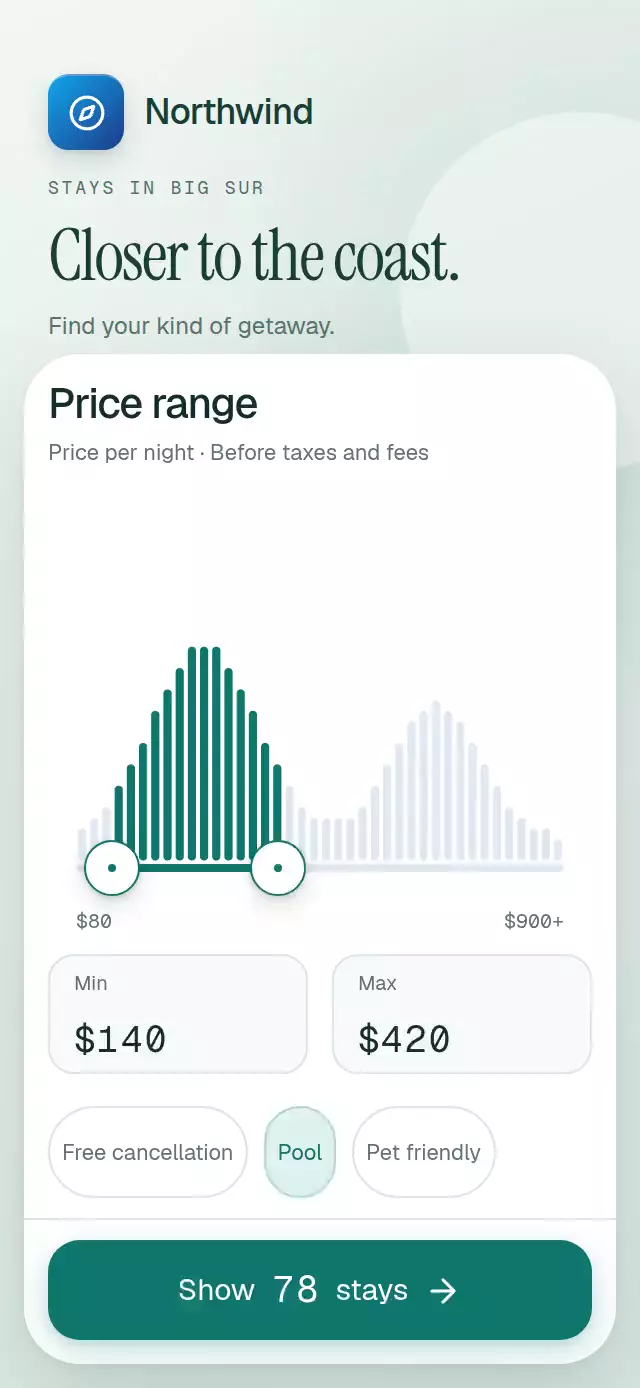
A plain range slider hides what you exclude. Here, 40 bars reveal two price clusters, a crossed bar lifts by 4 points, and amenity filters shrink the actual histogram from left to right. The result count comes from the same bins and selected range, rather than an unrelated demo number.
How it works
- One shared range object drives both handles, the selected track, bar colors, and result digits on the UI thread.
- Pan gestures interrupt springs. A minimum gap prevents crossed handles; approaching the neighbor pushes the range with a near-critical spring.
- Each Skia bar detects whether its midpoint crosses an endpoint and briefly lifts before settling.
- A shared filter bitmask determines the retained fraction. Bars spring to their reduced heights with a 9 ms stagger.
- Static digit strips render the changing prices and count without React updates per frame. The count rolls only when a digit changes and rests on a whole digit.
- React receives settled selections for callbacks and accessibility. Editing a field commits on Return or blur. Empty input leaves the previous value unchanged.
Install
npx expo install @shopify/react-native-skia react-native-gesture-handler react-native-reanimated react-native-workletsPlace the app inside GestureHandlerRootView. For web, initialize CanvasKit before importing the component, using Skia's LoadSkiaWeb / WithSkiaWeb loading pattern. The component must be imported after initialization; use the catalog's deferred Skia registration when adding the demo. The optional demo also uses expo-linear-gradient.
Icons: Lucide (ISC). Paths copied from the project kit; attribution is retained in icons.ts.
Usage
import { PriceRangeHistogram } from './price-range-histogram';

<View style={{ height: 540 }}>
  <PriceRangeHistogram
    initialRange={{ min: 140, max: 420 }}
    onShowResults={(range, count, filters) => openResults(range, count, filters)}
  />
</View>
With custom data and personality knobs:
const filterRef = useRef<PriceRangeHistogramRef>(null);

<PriceRangeHistogram
  ref={filterRef}
  title="Your nightly budget"
  bins={priceBins}
  filters={[
    { id: 'pool', label: 'Pool', retention: 0.61 },
    { id: 'pets', label: 'Pet friendly', retention: 0.73 },
  ]}
  accentColor="#0F766E"
  colorScheme="light"
  minimumGap={60}
  crossingLift={3}
  staggerMs={12}
  fontFamily="YourSans"
  monoFontFamily="YourMono"
/>

// Imperative controls are for app flows; autoplay stays outside the component.
filterRef.current?.setRange({ min: 140, max: 420 });
filterRef.current?.setFilter('pool', true);
filterRef.current?.reset();
Props
| Prop | Type | Default | Purpose |
|---|---|---|---|
bins | PriceHistogramBin[] | Invented 40-bin distribution | Ascending midpoint prices and nonnegative stay counts; up to 40 bins. |
filters | PriceHistogramFilter[] | Cancellation, pool, pets | Up to three filters; retention fractions multiply. |
minimumPrice / maximumPrice | number | 80 / 900 | Price bounds; the upper bound represents that price and higher. |
minimumGap | number | 40 | Minimum separation in dollars. |
initialRange | PriceRange | { min: 140, max: 420 } | Initial uncontrolled selection and reset destination. |
title | string | Price range | Sheet heading. |
subtitle | string | Per night, before taxes and fees | Price context. |
filtersLabel | string | A few essentials | Filter section heading; empty string hides it. |
resultLabel | string | stays | Result noun. |
accessibilityLabel | string | Price range filter | Container label. |
accentColor / inactiveColor | string | #0F766E / #E2E8F0 | Selected and excluded bars. |
colorScheme | 'light' | 'dark' | 'auto' | 'auto' | Sheet appearance. |
fontFamily / headingFontFamily / monoFontFamily | string | System | Text, heading, and numeric typefaces. |
crossingLift | number | 4 | Bar lift in points. |
staggerMs | number | 9 | Delay between filter spring starts. |
springDamping | number | 28 | Damping, with a near-critical lower bound. |
onChange | (range, count, activeFilters) => void | — | Settled changes. |
onShowResults | (range, count, activeFilters) => void | — | Result button action. |
onInteraction | () => void | — | Stops external autoplay on user input. |
style / testID | StyleProp<ViewStyle> / string | — | Container customization and testing. |
The ref exposes setRange(range), setFilter(id, active), and reset(). Values are clamped to the available price bounds. Prices snap to $10 on gesture release; typing supports other dollar values. A tap on the histogram moves the closest endpoint. A tap on a handle moves it inward by $20; direct field entry and screen-reader increment/decrement cover both directions.
Compatibility
Targets Expo SDK 58, React Native 0.88.0, Reanimated 4.7.1, Worklets 0.13.0, Gesture Handler 3.3, and Skia 2.14.0. Uses installed Expo Go modules; no extra native library or haptics dependency is needed. Supports iOS, Android, and web.
The root uses flex: 1 and measures its track with onLayout. The form scrolls independently above the result button for small containers and larger accessibility text. Native apps should resize the keyboard viewport when presenting this filter.
Accessibility
Every action has a role and label. Handles are adjustable with increment/decrement actions, fields accept numeric entry, and filter chips expose checkbox states. Touch areas are at least 44 points. Settled range/filter changes are announced, and the result button exposes a polite live region. Reduced motion removes bar lifts, handle enlargement, spring travel, stagger, and rolling numbers; state changes use 200 ms fades.
Demo timeline
The Northwind demo uses the kit's blue compass tile and a white, 28-point filter sheet with teal controls. Autoplay opens the full range at 0.1 s, moves minimum to $140 at 0.48 s, maximum to $420 at 1.15 s, and selects Pool at 1.9 s. It repeats every 4.8 s and stops permanently on touch or accessibility input. The unfiltered $140–$420 range contains exactly 128 invented stays; Pool reduces it to 78.