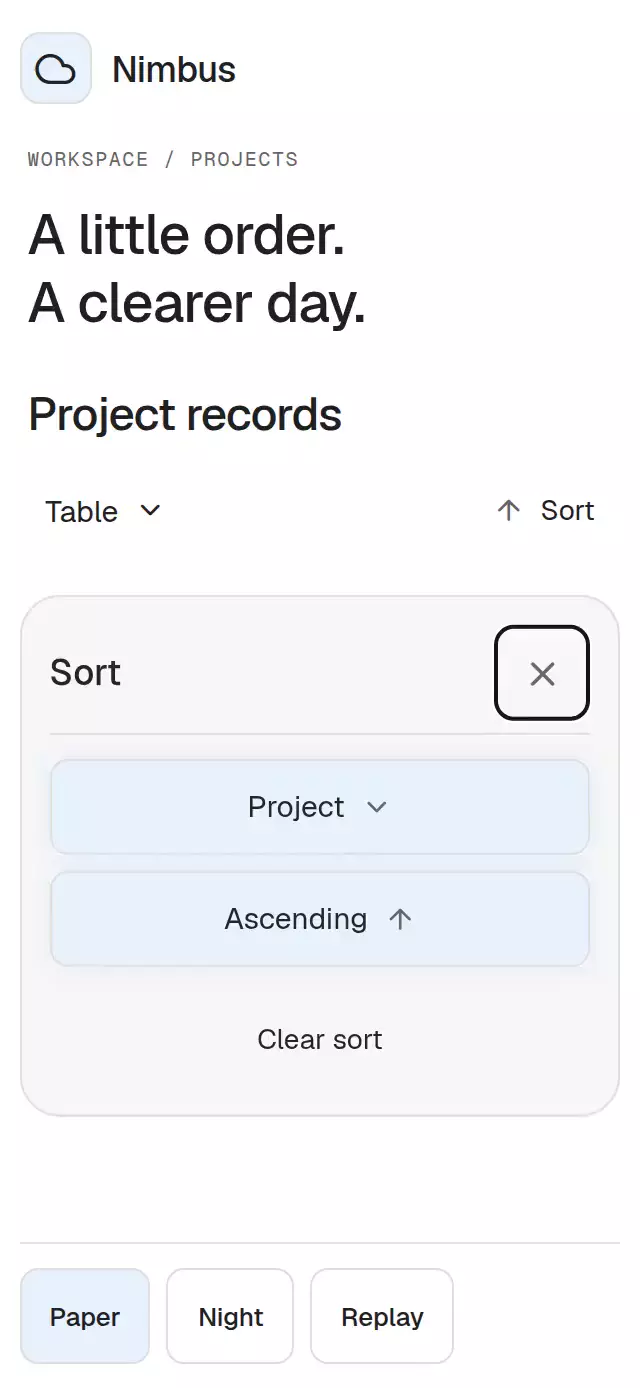
About this animation
A sortable record table with animated row reordering and expandable details, with configurable rows, columns, palette, and fonts.
How it works
- Supply immutable rows, stable IDs and raw-value column accessors. Formatters affect presentation only.
- Open Table → Sort, choose a field and choose its direction. Selecting an option commits that criterion; closing the panel alone leaves the records unchanged.
- Stable sorting keeps equal values in input order. Null, undefined, invalid dates, NaN and infinities come last in both directions. Clearing restores input order.
- A single reorder progress drives all mounted row offsets and the toolbar indicator. A second sort samples the current presentation before starting its next 280 ms transition.
- A FlatList renders a small window, initially 10 records with a three-viewport render window. Offscreen records do not acquire individual animation clocks. Very distant moves appear at their destination rather than flying through the entire dataset.
- Horizontal scroll owns column overflow; the vertical list owns row scrolling. Neither offset is reset by sorting. Short hosts edit criteria in the document flow, replacing the table temporarily with a scrollable editor.
Install
Copy this folder without demo/ into your project. Keep both platform versions of usePanelKeyboard.
npx expo install react-native-reanimated react-native-worklets @expo/vector-iconsUse the Expo SDK 58 Reanimated setup (the standard Expo preset configures its worklet transform). No images, server, global theme or catalog provider is required. Icons use the kit-approved Feather font renderer; exact Lucide source paths are retained in icons.ts. Icons: Lucide (ISC), Feather (MIT).
Usage
import { SortableRecordTable, type Column } from './sortable-record-table';

type Record = { id: string; name: string; count: number };
const columns: Column<Record>[] = [
  { id: 'name', label: 'Name', accessor: row => row.name },
  { id: 'count', label: 'Count', accessor: row => row.count, presentation: 'number' },
];
const rows = [{ id: 'a', name: 'Notes', count: 12 }];

export function Records() {
  return (
    <SortableRecordTable
      rows={rows}
      getRowId={row => row.id}
      columns={columns}
      labels={{ title: 'Records' }}
    />
  );
}
A controlled example with appearance and motion knobs:
const [sort, setSort] = useState<Sort | null>(null);
const table = useRef<SortableRecordTableHandle>(null);

<SortableRecordTable
  ref={table}
  rows={rows}
  getRowId={row => row.id}
  columns={columns}
  sort={sort}
  onSortChange={setSort}
  colorScheme="dark"
  palette={{ accent: '#93BDFF', focus: '#93BDFF' }}
  motion={{ durationScale: 0.8, glowOpacity: 0.1 }}
  labels={{ title: 'Records', ascending: 'Ascending', descending: 'Descending' }}
/>;

// The same public action used by the demo:
table.current?.sortBy('count', 'desc');
Import useState, useRef, Sort and SortableRecordTableHandle in the controlled example. For remote pagination, set manualSorting and fetch the next server result in onSortChange. The received subset is displayed in its supplied order, without another local sort. Keep getRowId, columns, formatters and rows referentially stable when possible.
Props
| Prop | Default | Purpose |
|---|---|---|
rows, getRowId, columns | Required | Immutable data, stable identity and field definitions. |
sort, defaultSort, onSortChange | Uncontrolled, null | Criterion { columnId, direction: 'asc' | 'desc' }; controlled props take precedence. |
manualSorting | false | Request server sorting and preserve received order. |
filterValue, defaultFilterValue, onFilterChange, filterRow | No filter UI | A predicate enables the input; controlled text or internal text feeds the predicate. |
expandedRowId, defaultExpandedRowId, onExpandedRowChange | null | Detail identity follows the record through sorting and filtering. |
renderDetails | None | Enables accessible first-cell detail actions and a scrollable detail region below the table. |
loading, error, onRetry | false, null, none | Replaces the table with a status or error and optional retry. |
disabled | false | Blocks inputs and ref actions except reset. |
labels | Neutral English copy | All structural strings plus rowPosition(position,count) and sortAnnouncement(column,direction). |
colorScheme, palette | auto, none | Complete Paper/Night themes; override any of the 19 exported palette tokens. |
fontFamily, titleFontFamily, monoFontFamily | System | Independent body, heading and numeric families. |
motion | Scale 1, glow 0.12 | durationScale clamps to 0.5–2; glowOpacity clamps to 0–0.3. |
style, testID, accessibilityLabel | None, sortable-record-table, title | Root style comes last, stable control IDs and table name. |
ref | None | sortBy, clearSort, openSort, closeSort, expandRow, reset. |
Columns expose id, label, accessor, format, compare, sortable, minWidth, priority and presentation (text, tag, number). The first column is the identifier. Columns remain in supplied order; priority is advisory metadata for a consumer's column selection. Default minimum widths are 170 pt for the identifier and 126 pt for subsequent fields; horizontal scrolling preserves readable text rather than shrinking columns. The identifier remains first in the table, but is not pinned during horizontal scrolling.
Custom comparators receive raw non-null values. Default comparisons use numeric order for numbers, epoch order for Dates, false before true for booleans, and localeCompare for text or mixed types. Supply Intl.Collator(...).compare for explicit text collation. Non-finite comparator results act as ties. Accessors, formatters, predicates and comparators are application code and must not throw.
Empty/whitespace IDs and later duplicate record IDs are omitted. Duplicate or empty column IDs are omitted. Removing or disabling an active sort column clears the effective criterion immediately and requests onSortChange(null) once per invalid criterion. A controlled parent must accept that request; the table never overwrites a controlled prop. Unknown detail IDs similarly request collapse once. Filtering hides a selected detail row from the table without losing its identity. reset() requests the initial criterion/filter/detail values, cancels pending invalidation callbacks and closes menus; it preserves scroll. Ref actions on unknown column/row IDs are ignored.
Compatibility
Designed for Expo SDK 58, React 19.2, React Native 0.88.0 and Reanimated 4.7.1. Supports iOS, Android and web, including Expo Go with the listed packages. The host owns safe areas; the embedded component adds none. Use a bounded, flex-enabled parent. The demo alone imports the catalog's Geist families and adds safe areas. Raster assets, blur surfaces and gestures requiring Gesture Handler are not used.
Accessibility
Controls have at least 48 pt targets, labels and disabled/selected states. Cells announce their field and record position. Sort changes announce once per committed criterion, including externally controlled changes. Web provides Tab focus containment, arrow navigation, Enter/Space activation and Escape to close the editor, then restores the invoking focus. Native opening/closing moves screen-reader focus to the close button/trigger; Android Back closes the panel. The selected row keeps its key while mounted, and detail state follows its ID.
Reduced motion removes row travel and panel movement. The preference is observed while mounted. Text respects system scaling; columns grow and the uniform row height accommodates measured multiline content. RTL uses logical borders and spacing. Provide translated labels and column/data formatters as needed. Paper category tags use a single blue tint; Night uses a green category tint with a light blue action accent. Selection also includes a checkmark and direction glyph.
Why this one
This is a record table rather than a magnitude chart: every cell stays attached to its record, ordering is stable, and raw dates and numbers retain their meaning. The compact panel, neutral grid and restrained tags keep the emphasis on the records. Extra filters and details appear only when configured.
The demo's five project records, blue tag family, compact-host behavior, dark sorting panel and 280/160 ms timings are original adaptations. The reference consists of static screens, so those timings are design targets rather than measurements of its interaction.