About this animation
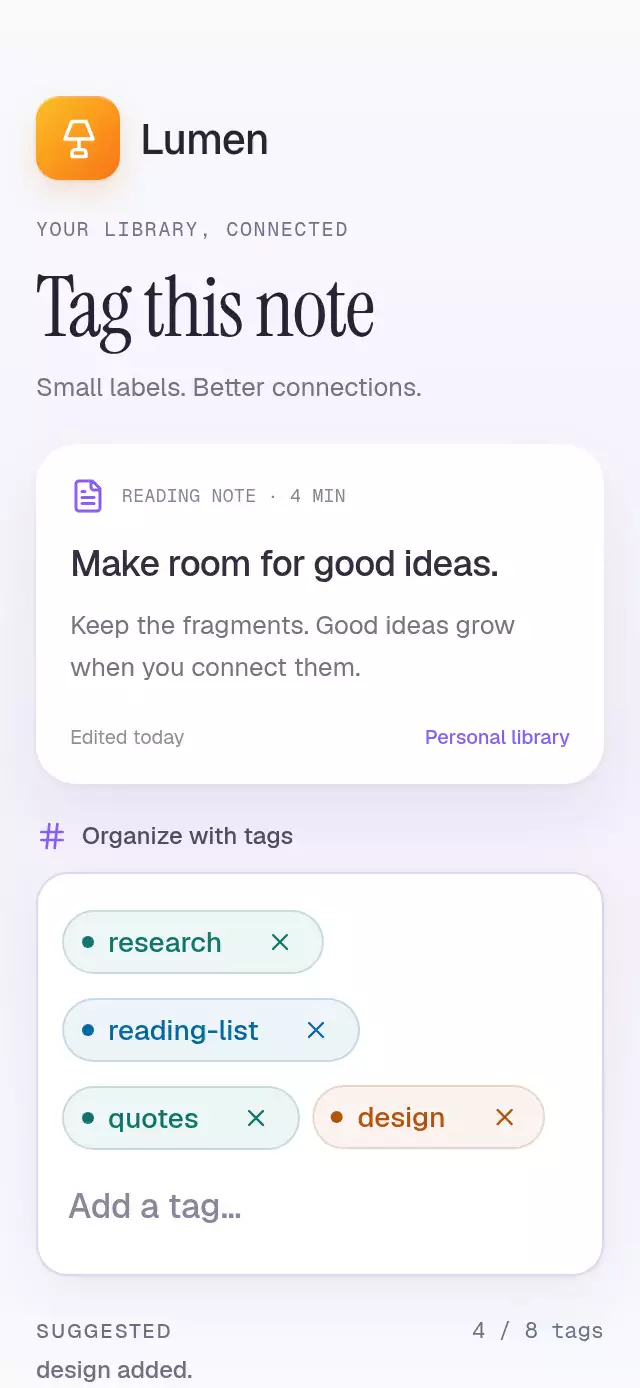
A tag input with suggestion flights and animated token creation, with configurable suggestions, placeholder, token colors, and fonts.
Why this one
Ordinary tag fields insert pills abruptly. Here, the typed label shrinks from 17 to 14 pt while its pill material grows around it. Suggestions travel from their measured screen positions. Empty-field Backspace selects the last token first; a second Backspace dissolves it into six particles. Duplicate tags highlight the existing token instead of creating clutter.
How it works
- Normalize labels and update logical data only for input events. React never updates for animation frames.
- Measure the draft or suggestion with
measureInWindow, then measure the destination token on layout. Their difference supplies the actual flight origin, including horizontal suggestion scrolling. - Derive flight, text size, and material expansion from one shared entrance progress. Entrance springs use damping 26, stiffness 240, and mass 1. Layout springs use damping 50, stiffness 240, and effective mass 4.
- Animate wrapping layout when tokens change lines. Each token has an independent press scale so release cannot cancel a flight.
- Keep a deleted token in its original slot until its shared burst progress finishes. Notify JS through
scheduleOnRN, then let the remaining layout settle. - Replace flights and particles with 200 ms fades for reduced motion. Announce additions, selection, duplicates, limits, and removals.
Install
npx expo install expo-image react-native-reanimated react-native-workletsCopy the four files listed in piece.json. No demo, theme import, assets, Skia initialization, or additional native configuration is needed. Icons: Lucide (ISC), copied from the project kit and rendered as SVG image sources.
Usage
import { TagTokenInput } from './tag-token-input';

<TagTokenInput
  initialTags={['research']}
  suggestions={['ideas', 'reading-list']}
  onChange={tags => storeTags(tags)}
/>
With appearance and external controls:
const tagsRef = useRef<TagTokenInputRef>(null);

<TagTokenInput
  ref={tagsRef}
  maxTags={8}
  accentColor="#8B5CF6"
  tagColors={['#7C3AED', '#0F766E', '#B45309']}
  colorScheme="light"
  fontFamily="YourInterfaceFont"
  monoFontFamily="YourMonoFont"
  style={{ flex: 0 }}
/>
// In a button handler:
tagsRef.current?.choose('ideas');
The host loads any custom fonts. The component defaults to system fonts. Give the container available width; it uses onLayout, not window dimensions. The demo uses the shared Geist, Instrument Serif, and Geist Mono fonts.
Props
| Prop | Type | Default | Description |
|---|---|---|---|
| initialTags | string[] | [] | Initial normalized, unique labels; reset restores these. |
| suggestions | string[] | [] | Horizontally scrollable choices. |
| maxTags | number | 8 | Maximum committed labels. |
| accentColor | string | #8B5CF6 | Selection and focus color. |
| tagColors | string[] | Violet, teal, amber, blue | Deterministic token colors; use six-digit hex colors. |
| fontFamily | string | System | Label and input font. |
| monoFontFamily | string | System | Count font. |
| placeholder | string | Add a tag… | Empty draft hint. |
| colorScheme | light / dark / auto | auto | Surface and text appearance. |
| onChange | (tags: string[]) => void | — | Logical additions and removals. |
| onInteraction | () => void | — | Touch, editing, focus, or suggestion selection. |
| accessibilityLabel | string | Tags | Text field label. |
| style | StyleProp<ViewStyle> | — | Root overrides; root defaults to flex: 1. |
| testID | string | — | Root test identifier. |
duration | number | 350 | Tag-limit feedback fade duration in milliseconds. Spring physics and reduced-motion timing are unchanged. |
initialTags | string[] | [] | Starting labels. |
suggestions | string[] | [] | Suggested labels below the field. |
maxTags | number | 8 | Maximum number of tags. |
accentColor | string | '#8B5CF6' | Accent for selection and focus. |
tagColors | string[] | COLORS | Colors assigned deterministically to labels. |
fontFamily | string | undefined | Interface typeface. |
monoFontFamily | string | undefined | Typeface for the counter. |
placeholder | string | 'Add a tag…' | Empty draft hint. |
colorScheme | 'light' | 'dark' | 'auto' | 'auto' | Light, dark, or device appearance. |
onChange | (tags: string[]) => void | undefined | Reports committed labels. |
onInteraction | () => void | undefined | Called when the user interacts, allowing autoplay to stop. |
accessibilityLabel | string | 'Tags' | Screen-reader field label. |
style | StyleProp<ViewStyle> | undefined | Outer container overrides. |
testID | string | undefined | Test identifier. |
Ref methods: add(label), choose(label), setDraft(text), commit(), backspace(), reset(), and focus(). Labels are case-insensitive, have their initial hash removed, and are limited to 24 characters. Enter, comma, and space commit input. The field is uncontrolled after initialization; onChange provides the current logical labels.
Compatibility
Expo SDK 58; React Native 0.88.0; Reanimated 4.7.1; worklets 0.13.0. Compatible with the installed Expo Go modules. iOS, Android, and web are compilation targets. No Skia dependency.
Accessibility
All buttons have roles and labels. Removal targets and suggestions are at least 44 pt. Backspace selection is announced, and every token also has a direct remove button. Important changes use polite live regions and screen-reader announcements. Reduced motion eliminates flights, shaking, particles, and layout travel; additions and deletions fade over 200 ms. The counter fades without rolling digits. There are no blurs or trails.
Demo timeline and review notes
Autoplay types design at 420–845 ms, commits around 1.05 s, and flies ideas around 1.8 s. It highlights a duplicate, selects the last tag, and deletes it before repeating every 4.9 s. Any user touch or editing stops the loop; timers are cleared on unmount.
The Lumen tile uses the kit's lamp glyph and amber-to-orange gradient. The note and editor use white surfaces, double shadows, and violet accents. The top right is reserved for the viewer close button. At 390×844 and 320×694, content remains in a wrapping column with scroll fallback rather than fixed vertical coordinates. The tag field stays full width; important labels are not clipped. All effects belong to pill material or individual particles; no opaque effect block crosses text.