About this animation
A tarot card fan with lift, flight, and flip reveals, with configurable card faces, card back, palette, and fonts.
Why this one
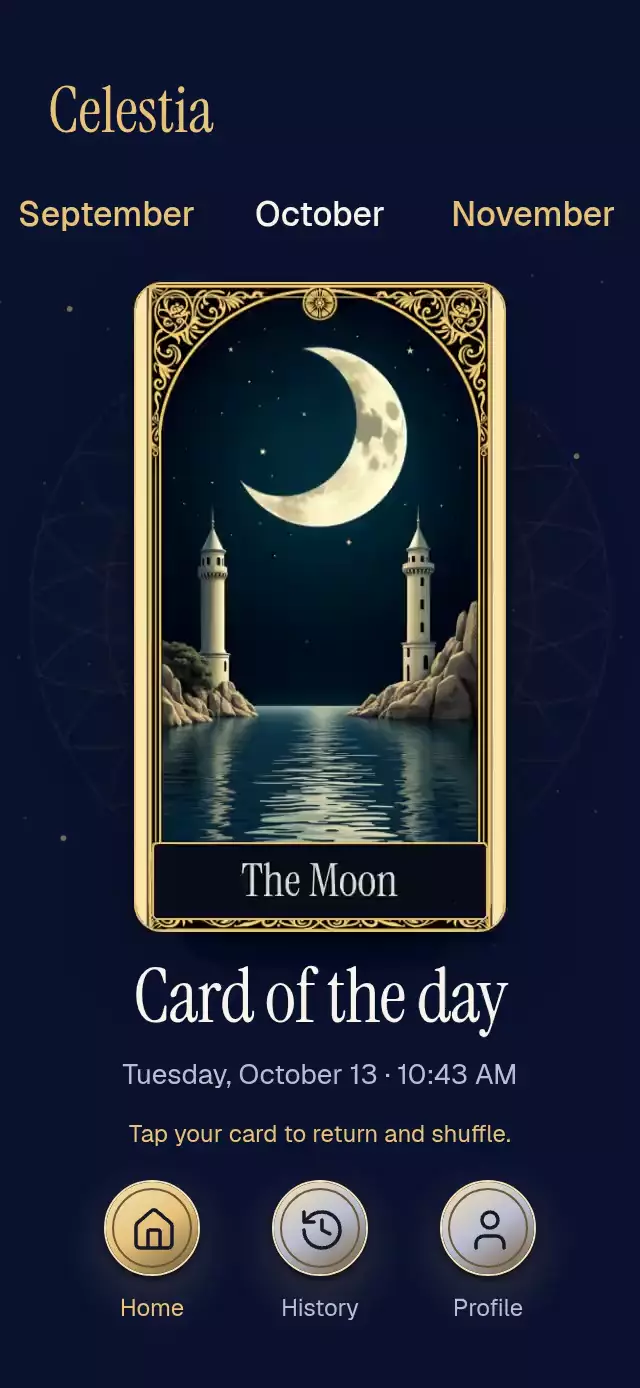
Instead of presenting an already revealed card, the user chooses it with a continuous horizontal gesture. Original celestial artwork, a slow line mandala, and a named inset plaque give the reveal a deliberate sense of occasion. The gold highlight follows the card's actual border rather than covering the artwork.
How it works
- One UI-thread choreography progress controls the selected card's flight, scale, perspective flip, the other cards' collapse, plaque opacity, border trim, and particles.
- A continuous hover value raises the nearest card by 14 points. A separate pressure value provides immediate 0.97 feedback without canceling the reveal.
- Gesture Handler composes pan and tap exclusively. The fan closes from the outside inward with 25 ms between symmetric slot pairs. Every card rotates and scales around its bottom center; deck cards stay opaque with fixed slot layers, and the selected slot stays above them throughout its flight and return.
- Reset returns the selected card to the closed stack before reopening the fan with a damped spring (
damping: 30,stiffness: 280,mass: 1). One progress value drives all three phases; a draw requested during reopening runs when the fan settles. - Back and face are separate layers with hidden backfaces. The front turns from −180° to 0° and never mirrors the artwork.
- At the end of a reveal, a UI reaction schedules the callback and screen-reader announcement on the JS thread. Reset rotates the face assignments only after the card returns.
- Layout uses the host's measured bounds, caps the face at 256 points for 3× demo image density, and uses vertical scrolling when the host is too short.
Install
npx expo install react-native-reanimated react-native-worklets react-native-gesture-handler expo-image expo-linear-gradient @shopify/react-native-skiaWrap the app in GestureHandlerRootView. Follow Skia's web setup and load CanvasKit before mounting the component on web. The component has no imports from the demo or project theme. Load your own fonts before use; omitted font props use the system font. Icons: Lucide (ISC).
Usage
import { TarotCardDraw } from './tarot-card-draw';

<TarotCardDraw
  back={require('./assets/back.jpg')}
  faces={[
    { image: require('./assets/sun.jpg'), name: 'The Sun' },
    { image: require('./assets/moon.jpg'), name: 'The Moon' },
  ]}
  date="Tuesday, October 13 · 10:43 AM"
  months={['September', 'October', 'November']}
  initialMonth={1}
  onDraw={(face) => saveReading(face.name)}
/>
const deck = useRef<TarotCardDrawRef>(null);
<TarotCardDraw
ref={deck}
back={back}
faces={faces}
months={months}
date={formattedDate}
serifFontFamily="InstrumentSerif_400Regular"
revealDuration={580}
breathAmplitude={1.5}
palette={{ accent: '#E6C27A', muted: '#B9BDD0' }}
onInteraction={stopGuidedDemo}
/>;
// Draw a fan slot, not a face index.
deck.current?.draw(4);
deck.current?.reset();Props
| Prop | Type | Default | Purpose |
|---|---|---|---|
back | ImageSourcePropType | Required | Card back image |
faces | readonly TarotFace[] | Required | Images with names; empty lists cannot draw |
date | string | Required | Host-formatted date and time |
months | readonly string[] | Required | Month carousel; supply at least one month |
initialMonth | number | 0 | Initial active month |
brand | string | Omitted | Optional wordmark without logo |
title | string | Card of the day | Main heading |
drawHint | string | Follow your intuition. Choose a card. | Ready instruction |
resetHint | string | Tap your card to return and shuffle. | Revealed instruction |
palette | Partial<TarotPalette> | Midnight and gold | Override background, accent, text, muted, card, metalLight, metalDark, icon, glow |
fontFamily | string | System | Body font |
mediumFontFamily | string | Body font | Month labels |
serifFontFamily | string | System | Headings and card plaques, scaled ×1.18 |
revealDuration | number | 580 | Reveal duration in milliseconds |
breathAmplitude | number | 2 | Fan breathing amplitude in degrees |
onDraw | (face, slot) => void | Omitted | Called once when a reveal settles |
onMonthChange | (index) => void | Omitted | Month change; host can update date |
onInteraction | () => void | Omitted | Stops guided autoplay on touch |
navigationLabels | readonly [string, string, string] | Home, History, Profile | Bottom control labels |
onNavigate | (index) => void | Omitted | Host navigation callback |
accessibilityLabel | string | Choose a daily card | Ready deck label |
formatAnnouncement | (face) => string | Face name | Custom reveal announcement |
style | StyleProp<ViewStyle> | Omitted | Root style |
testID | string | tarot-card-draw | Stable control identifier prefix |
Ref: draw(index) chooses a fan slot 0–6 (clamped); reset() returns and shuffles; browse(index) moves the highlight. While a different card is airborne, return it before drawing another slot. The current draw can be interrupted by reset and resumed by drawing the same slot.
Demo timeline
Fan for 1 second → browse two slots at 1.0 and 1.3 seconds → draw at 1.6 seconds → hold the revealed card for at least 3 seconds → return at 5.5 seconds → repeat at 6.4 seconds with another slot. Every timer is canceled on unmount; touching any control stops subsequent autoplay actions. Navigation buttons change the demo's copy; application navigation belongs to the host.
Compatibility
Expo SDK 58, React Native 0.88.0, Reanimated 4.7.1, Worklets 0.13.0, Skia 2.14.0. Uses installed Expo Go modules. Supports iOS, Android, and web. The host supplies safe-area insets. Short containers and landscape use vertical scroll instead of overlapping controls. Demo assets are 768×1344, with a maximum rendered face of 256×448 points.
Accessibility
The deck supports tap as an alternative to drag, plus screen-reader activate, increment, decrement, and escape actions. Months support adjustable actions and direct taps. Navigation has button roles, selected states, and labels with 48-point metallic targets. Reveal names and month changes are announced. Reduced motion stops breathing and mandala rotation, removes flights, flips, particles, and edge sweeps, and switches between opaque card layers without moving the deck. Text scaling stays enabled; compact layouts scroll.