About this animation
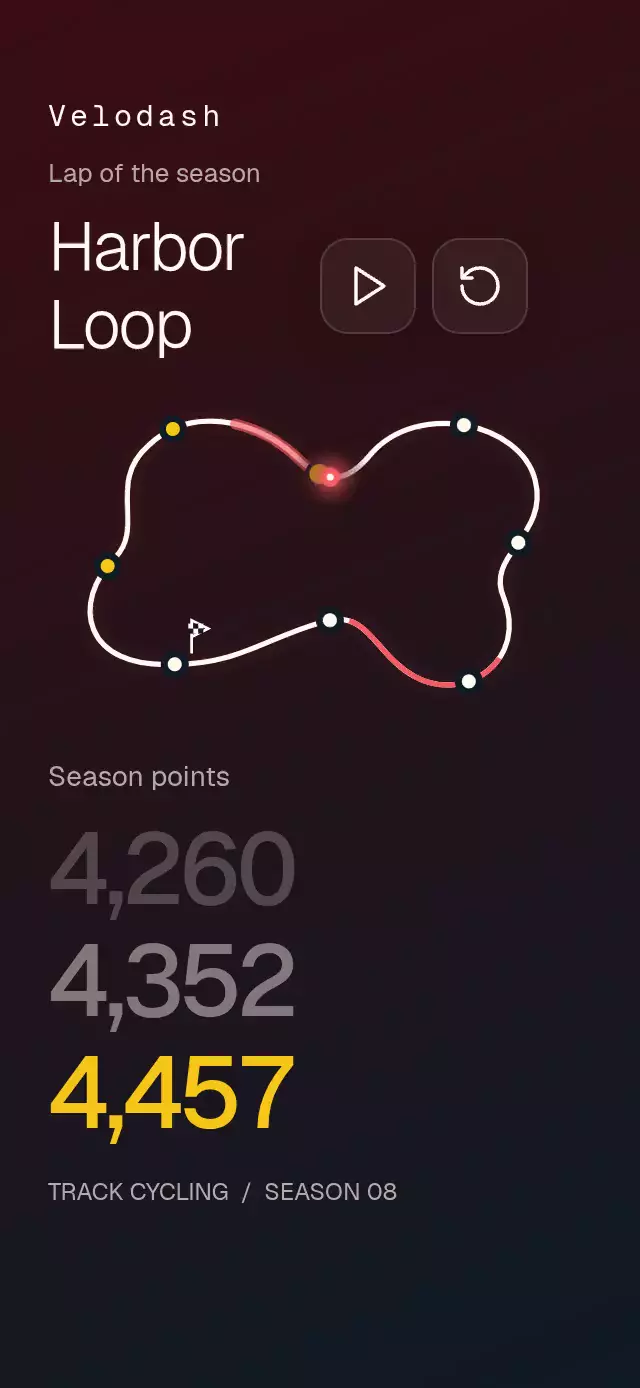
A traced-lap score display with rising totals and configurable track path, checkpoints, colors, and fonts.
Why this one
Sports statistics usually hide accumulation in a table. This component connects each gain to a visible place on a custom circuit. Scrub backward to see precisely where a total came from. The demo is an original fictional track-cycling league, with a text-only identity.
How it works
- Skia measures the closed SVG path once and samples 256 segments at equal distances. Point arrays are closed automatically.
- A single UI-thread progress value drives the marker, red trail, checkpoint lights, flag, and score stack.
- Drag and tap project onto the nearest sampled segment, including interpolation between samples. Touch immediately cancels playback.
- Each checkpoint raises the stack by one complete row. Static formatted totals retain exact digits and natural separator widths; no live text mutation is required.
- The last checkpoint rests exactly on the final score. A radial light behind the active row and a waving finish flag mark completion.
- The demo calls
play()every six seconds: two laps make a twelve-second repeating program. Any user interaction stops the demo timer from advancing again.
Install
npx expo install @shopify/react-native-skia react-native-reanimated react-native-worklets react-native-gesture-handler expo-linear-gradientUse a GestureHandlerRootView in the host. Configure Reanimated as required by the host Expo SDK. On web, initialize CanvasKit before importing the component (the catalog uses its Skia lazy loader). No remote assets or additional fonts are needed. Icons: Lucide (ISC).
Usage
import CircuitStatsStack from './circuit-stats-stack';

<CircuitStatsStack />
const circuit = useRef<CircuitStatsStackRef>(null);
<CircuitStatsStack
ref={circuit}
title={'Garden\nCircuit'}
initialPoints={1000}
checkpoints={[
{ position: 0.25, points: 1100 },
{ position: 0.5, points: 1225 },
{ position: 0.75, points: 1300 },
{ position: 1, points: 1450 },
]}
colors={{ accent: '#82E4BE' }}
lapDuration={6000}
/>;
circuit.current?.play();
circuit.current?.seek(0.5);play() starts a new lap. seek(0..1) cancels playback and selects a position. Both can interrupt current animation.
Props
| Prop | Type | Default | Purpose |
|---|---|---|---|
| trackPath | string / TrackPoint[] | Original closed circuit | SVG path or points in a 320×210 view box |
| checkpoints | CircuitCheckpoint[] | Eight checkpoints | Lap fraction and cumulative total; sorted by position |
| title / subtitle | string | Harbor\nLoop / Lap of the season | Circuit heading and eyebrow |
| brand | string | Empty | Optional text identity |
| pointsLabel | string | Season points | Stack caption |
| instruction | string | Trace the lap. Watch your points climb. | Supporting copy |
| accessibilityLabel | string | Circuit progress | Adjustable circuit label |
| controlLabels | { play, reset } | Play a lap / Reset lap | Accessible button labels |
| colors | Partial<CircuitPalette> | Burgundy/petroleum, yellow, coral | Full palette: backgroundStart, backgroundEnd, text, muted, accent, marker, control, border |
| fontFamily | string | System | UI font |
| titleFontFamily / numberFontFamily / monoFontFamily | string | UI font | Heading, scores, identity |
| initialPoints | number | 4200 | Starting score; two preceding context totals are 110 and 220 lower |
| formatPoints | (number) => string | en-US | Formats whole totals and separators |
| lapDuration | number | 6000 | Lap milliseconds; minimum 400 |
| onCheckpoint | (index, points) => void | — | JS-thread checkpoint notification, including reverse scrubbing |
| onInteraction | () => void | — | Stops host autoplay on user input |
| style / testID | StyleProp<ViewStyle> / string | — / circuit-stats-stack | Host layout and stable control identifiers |
Layout and typography
The root fills its parent and measures itself with onLayout. Content width is capped at 420 pt. Short containers and landscape can scroll vertically; parent screens own safe-area insets. All text remains in flow and respects font scaling. The identity and controls sit below the viewer's upper-right close area. Score lines use a 1.12 line-height ratio and separate full-height rows, avoiding iOS clipping. The demo uses the installed Geist Medium for scores because Geist 600 is not loaded by the host; consumers may pass their own semibold face.
Accessibility
The circuit is adjustable with increment/decrement actions; tap-to-seek is the drag alternative. Buttons have 48×48 hit areas, accessible labels, and activation actions. Completion announces the formatted total. Reduced motion removes the trail, halo, flag wave, press scaling, and stack travel; checkpoint changes use a 200 ms fade. Invisible score rows are excluded from the accessibility tree.
Compatibility
Targets Expo SDK 58, React Native 0.88.0, Reanimated 4.7.1, Worklets 0.13.0, Gesture Handler 3.3, Skia 2.14.0 and Expo Linear Gradient 58. Expo Go uses its bundled native versions. Supports iOS, Android, and web.