About this animation
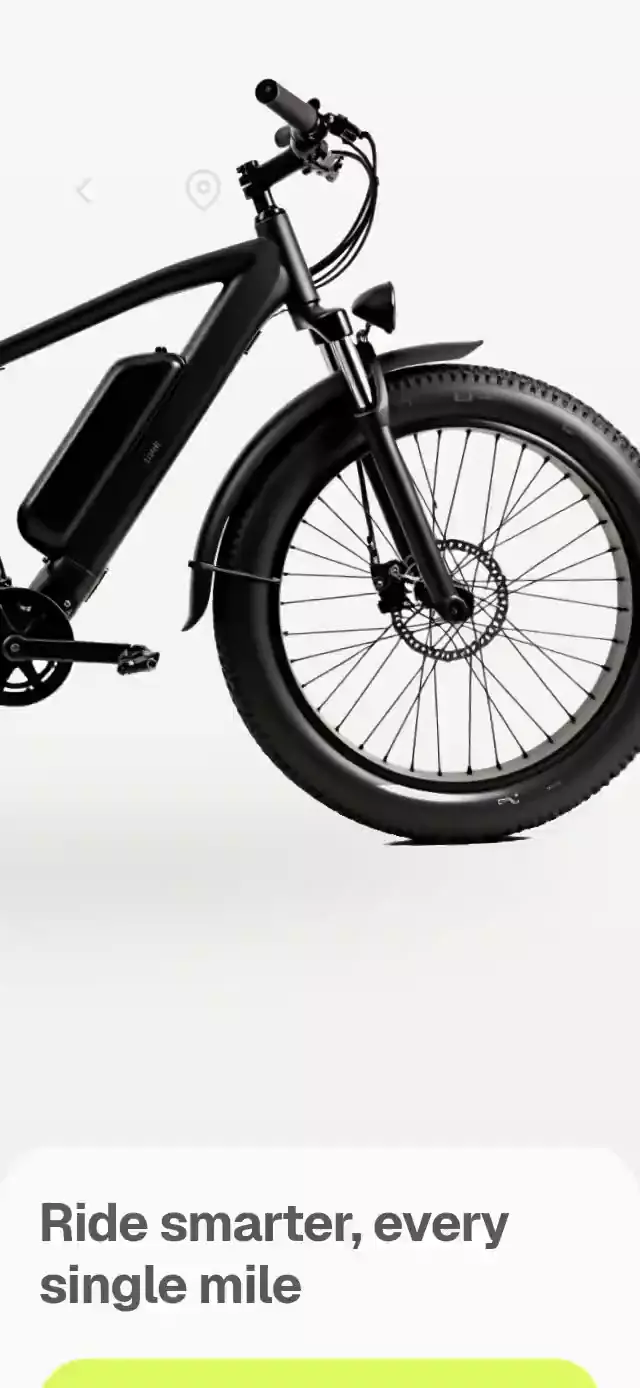
An e-bike welcome-to-dashboard transition with live ride controls and configurable bike image, stats, colors, and fonts.
Why this one
The bike stays mounted throughout the transition. Controls change the product itself: the headlight casts a soft cone, the bell shakes the frame, and booking gives the bike a short starting impulse.
How it works
- Measure the host with
onLayout. A compact arrangement handles short containers; wide hosts center a dashboard capped at 460 pt. - A continuous
stagevalue drives the reversible image transform, background, sheet, and staggered dashboard reveals. The image scales uniformly from 2.6 to 1. - A separate charge value fills the battery in 900 ms. Only integer changes cross to React for the accessible counter.
- The lamp uses a single Skia canvas for the blurred light cone, halo, and ground shadow. Controls have independent press feedback.
- A Gesture Handler pan drives booking progress. Release below 85% springs back; completing the track books once. Tapping the knob is an accessible alternative.
Install
npx expo install @expo/vector-icons @shopify/react-native-skia expo-image expo-linear-gradient react-native-gesture-handler react-native-reanimated react-native-workletsConfigure Reanimated and wrap the host app with GestureHandlerRootView. For web, initialize Skia/CanvasKit before mounting this component, following the Skia web setup. No additional native modules beyond those bundled in Expo Go are required.
Usage
import { EbikeRideDashboard } from './ebike-ride-dashboard';

<EbikeRideDashboard
  bikeImage={require('./assets/bike.webp')}
  model="Strata X1"
  onBook={() => openReservation()}
/>
const bike = useRef<EbikeRideDashboardRef>(null);
<EbikeRideDashboard
ref={bike}
bikeImage={require('./assets/bike.webp')}
bikeAspectRatio={1199 / 758}
headlightOrigin={{ x: 0.75, y: 0.29 }}
colors={{ accent: '#C4F15A', surface: '#FAFAF5' }}
stats={[
{ label: 'Ride Time', value: '2h 10m', tone: 'accent' },
{ label: 'Distance', value: '18.2 mi', tone: 'dark' },
]}
/>
// bike.current?.start(); bike.current?.back(); bike.current?.reset();Props
| Prop | Type | Default / purpose |
|---|---|---|
bikeImage | ImageSource | Required; image with alpha recommended |
bikeAspectRatio | number | 1199 / 758; prevents distortion |
onboardingTitle | string | Ride smarter, every single mile |
ctaLabel | string | Let's start the ride |
model, subtitle | string | Electric bike / Electric Fat Tire |
battery | number | 99; clamped to 0–100 |
stats | BikeStat[] | Usage Time and Distance; first two tiles |
toggles | BikeToggle[] | Headlight and Bell; first two controls |
bookLabel, bookedLabel | string | Swipe to Book / Booked · 2 h |
headlightOrigin | { x: number; y: number } | { x: .75, y: .29 } in image coordinates |
colors | Partial<Palette> | Accent, ink, surface, muted, tile, border, onInk, onAccent, welcomeTop, welcomeBottom, beam |
fontFamily | string | System; regular interface text |
titleFontFamily | string | System; headline face |
mediumFontFamily | string | System; buttons and values |
monoFontFamily | string | System; counting battery |
labels | Partial<Labels> | Back, Location, On, Off, Battery, Electric bicycle |
onStart, onBack, onBook | () => void | Transition and completion callbacks |
onToggle | (id, enabled) => void | Control state callback |
onLocation | () => void | Location button action |
style, testID | StyleProp<ViewStyle>, string | Host layout / ebike-ride-dashboard |
Ref methods: start(), back(), book(), toggle(id), reset(). Calls use the same transitions as user input. onBook fires once until reset. Returning to welcome preserves switch and booking state; reset() clears them.
Compatibility
Targets Expo SDK 58, React Native 0.88.0, Reanimated 4.7.1, worklets 0.13.0, and Skia 2.14.0. Supports iOS, Android, and web. This is a full-container composition; the host owns safe area insets. There is no internal scroll view. The demo passes Geist font names loaded once by its host; the exported component has no dependency on the catalog theme.
The supplied 1199 × 758 image covers the dashboard at about 3× on phone widths, but its intentional 2.6× onboarding crop exceeds 3× source density. Supply a larger original for maximum crop sharpness. The measured front-wheel crop anchor assumes a side-profile bicycle; a different silhouette may need the crop geometry adjusted.
Accessibility
Buttons have roles and labels; switches expose checked state. The slider supports tap and screen-reader activation in addition to drag. Reduced motion uses 200 ms fades, disables image travel, bell shake, idle waves, and lamp flicker. The host should verify large text, RTL, screen-reader focus, and real device frame rate before shipping.
Demo
The fictional Strata demo starts after 1.2 seconds, lights the headlamp at 3 seconds, rings at 4.5, books at 5.5, then resets at 8. Touching the demo stops autoplay. No audio is played by the bell.
Icons: Feather from @expo/vector-icons, the Lucide kit's supported fallback (MIT).