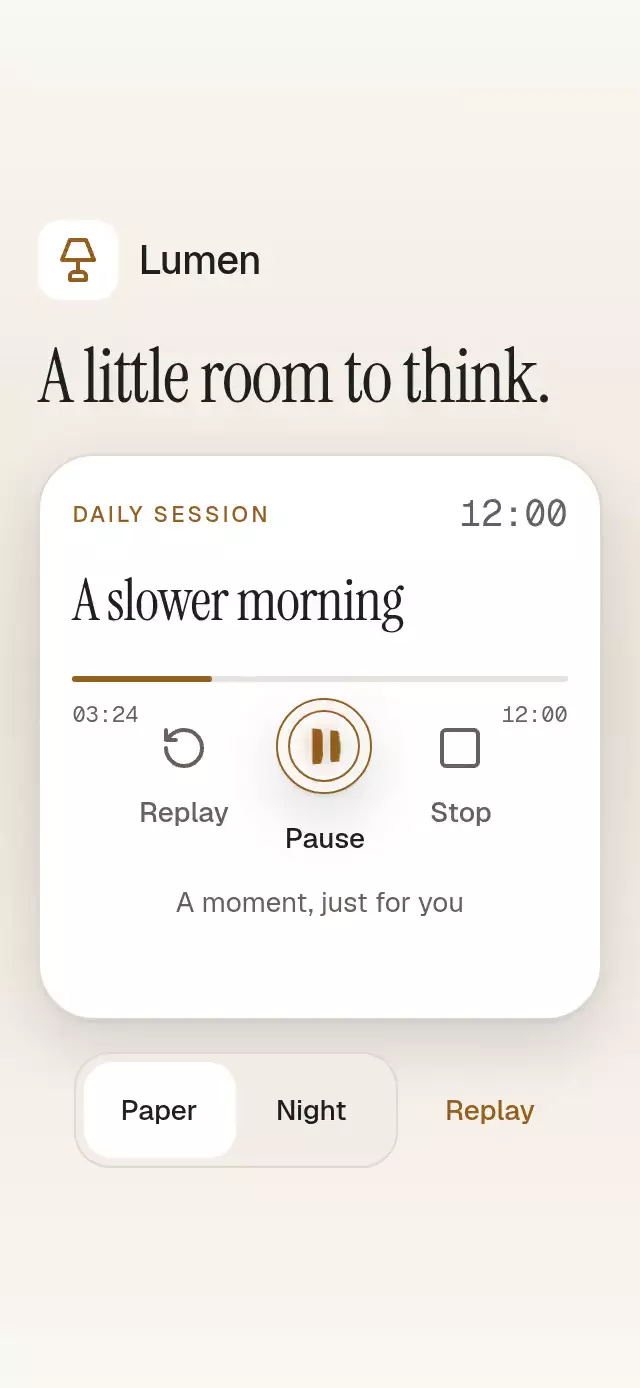
About this animation
These React Native animated icons connect play, pause, and stop through one reversible glyph inside a fixed transport disc. A spring updates contour coordinates directly, so a new target can interrupt the current shape without a crossfade. Business state stays separate from icon pose: a playing session shows Pause, while paused and stopped sessions offer Play. The host supplies controlled state or an initial state and connects requests to its own session or player. This is a focused transport control, not a general animated icon pack or an audio playback engine.
When to use it
- Explain play and pause state changes.
- Interrupt a transport icon morph.
- Connect a visual control to a host-owned session.
A transport button with reversible play, pause, and stop morphs, with configurable labels, button size, icon size, and palette.
How it works
- Split the kit's play triangle and stop square into two solid contours. Pause uses the kit's two bar bounds. Resample each contour to 32 points once at initialization.
- Animate a single master coordinate vector,
iconProgress, with an interruptible spring (damping: 32,stiffness: 300,mass: 1). New targets start from the current coordinates, including during rapid reversals. No icon crossfade or per-frame React state is used. - Build both contours in one glyph Canvas on UI. Recenter the actual polygon centroid every frame; the disc and Canvas dimensions remain fixed. The rounded kit contours are deliberately simplified to consistent solid polygons for the morph.
- Keep business state separate from icon pose. Playing shows Pause; paused and stopped show Play. Stop briefly targets Square for at most 300 ms. Its accessible action remains Play and an immediate Play interrupts the confirmation.
- Keep pressure and the 160 ms inner-ring attenuation separate from the morph. Reduced motion replaces geometry immediately. Spring settling is physics based rather than a guaranteed 240 ms endpoint.
Install
Copy this folder without demo/ into your project, then install compatible packages:
npx expo install @shopify/react-native-skia react-native-reanimated react-native-workletsUse the Expo SDK 58 Reanimated setup. On web, configure Skia's CanvasKit loader before importing this module, following the Skia web setup. The demo additionally uses expo-linear-gradient and react-native-safe-area-context and receives the repository's fonts.
Usage
import StateIconMorphButton from './state-icon-morph-button';

<StateIconMorphButton onStateChange={(next) => player.setState(next)} />
Controlled state and knobs:
const control = useRef<StateIconMorphButtonHandle>(null);

<StateIconMorphButton
  ref={control}
  state={state}
  onStateChange={setState}
  colorScheme="dark"
  size={80}
  iconSize={30}
  palette={{ accent: '#EBC181' }}
  motion={{ durationScale: 0.8, glowOpacity: 0.2 }}
  labels={{
    play: 'Play', pause: 'Pause', stop: 'Stop', replay: 'Replay',
    stopped: 'Stopped', playing: 'Playing', paused: 'Paused',
  }}
/>
Import React hooks and the exported handle type for the second example. Methods play(), pause(), stop(), and reset() request state through onStateChange exactly once per accepted request. Repeated requests still invoke the callback once. In controlled mode the host's state wins; methods do not force it. Replay requests playing and calls onReplay once. Reset requests the initial state, clears transient work, and is allowed while disabled.
Props
| Prop | Default | Purpose |
|---|---|---|
state | uncontrolled | stopped, playing, or paused; host authority |
defaultState | stopped | Initial state and reset destination |
onStateChange | — | Synchronous callback for each accepted request |
size / iconSize | 72 / 28 | Disc diameter and glyph size |
disabled | false | Blocks touch and ref actions except reset |
showStop | true | Display separate Stop action |
labels | Neutral English labels | Complete action and business-state copy, including announcements |
onReplay | — | Additional Replay callback |
colorScheme | auto | light, dark, or device theme |
palette | Paper / Night | Partial override of all 15 theme tokens and material highlight/shadows |
fontFamily | system | Interface and control font |
titleFontFamily | system | Reserved common API role; this control renders no heading |
monoFontFamily | interface font | State label font |
style | — | Root style, applied last |
testID | state-icon-morph-button | Root and stable -play, -stop, -replay selectors |
accessibilityLabel | — | Context prepended to the next action |
motion | { durationScale: 1, glowOpacity: 0.25 } | Duration scale 0.5–2 and radial halo opacity 0–0.3 |
NaN and Infinity use the size/motion defaults; finite values are clamped. Invalid runtime states fall back to stopped. Host measurements constrain the disc; provide at least a 48×48 area, with more room for the optional action labels. Controls wrap and text scales naturally. For narrow or short placements, the host owns scrolling. There are no safe areas inside the component. No raster assets: density and loading checks are N/A.
Compatibility
Targets Expo SDK 58, React Native 0.88.0, React 19.2.3, Reanimated 4.7.1, Worklets 0.13.0, and Skia 2.14.0. No new native packages are required in this repository. This is intended for Expo Go on iOS/Android and CanvasKit on web.
Accessibility
Buttons expose the next action, current business-state value, and disabled state. Focus remains on the same main Pressable while its glyph changes. All targets are at least 48×48 with wrapping labels. Native Pressable provides web Tab/Enter/Space activation; no modal, focus trap, or arrow-key navigation is introduced. A focus border uses the palette's focus color. Confirmed state changes request one screen-reader announcement; animation frames and the temporary Square do not announce. Reduced motion immediately replaces the glyph while preserving every action. Disabling also blocks imperative play/pause/stop.
Why this one
The surface stays a small disc. The visual action changes through continuous geometry, with optical mass recentered during the transition and immediate reversal available during Stop confirmation. It fits a player, timer, or guided-session control without implementing playback or asynchronous loading behavior.
Icons: Lucide (ISC), from the repository kit. The demo uses the kit's Lumen name and lamp glyph, recolored for Paper and Night.
FAQ
- Which icons does this component animate?
- It morphs its play, pause, and stop contours. It does not accept an arbitrary icon library as interchangeable geometry.
- Does it play audio?
- No. onStateChange requests stopped, playing, or paused state; the host implements the actual session or playback behavior.
- Does it support controlled state and reduced motion?
- Yes. The host state wins in controlled mode. Reduced Motion replaces the geometry immediately while keeping the accessible action aligned with business state.