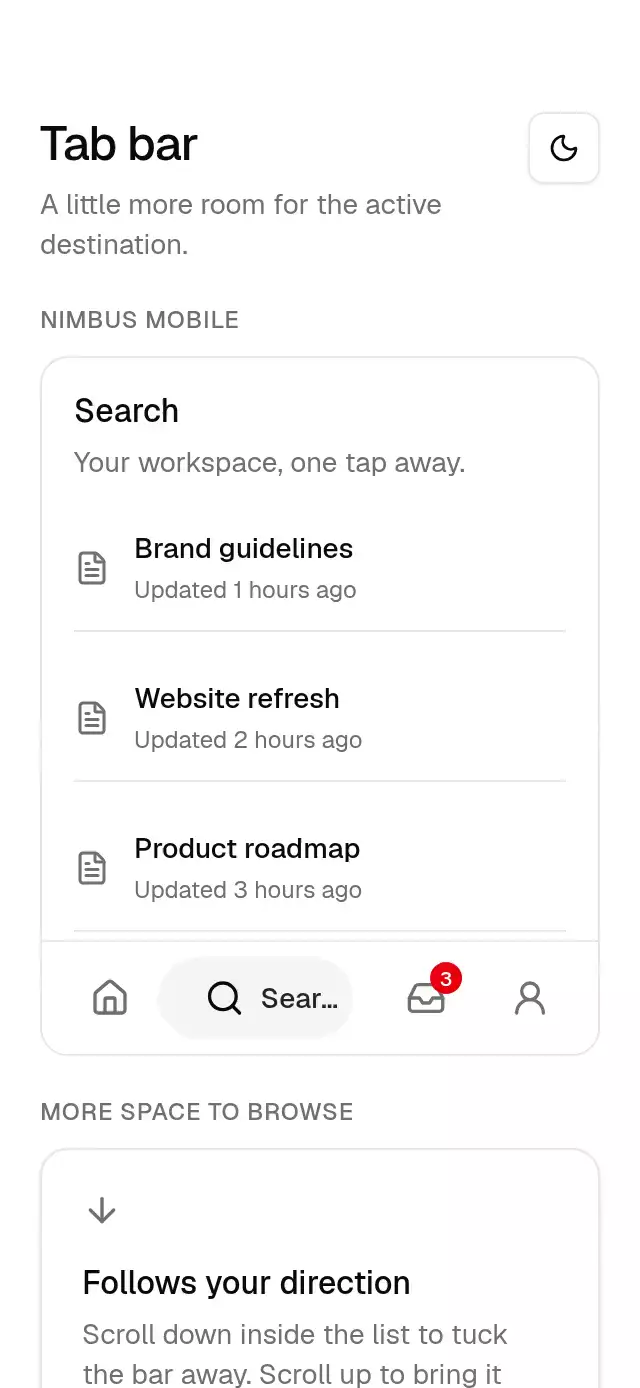
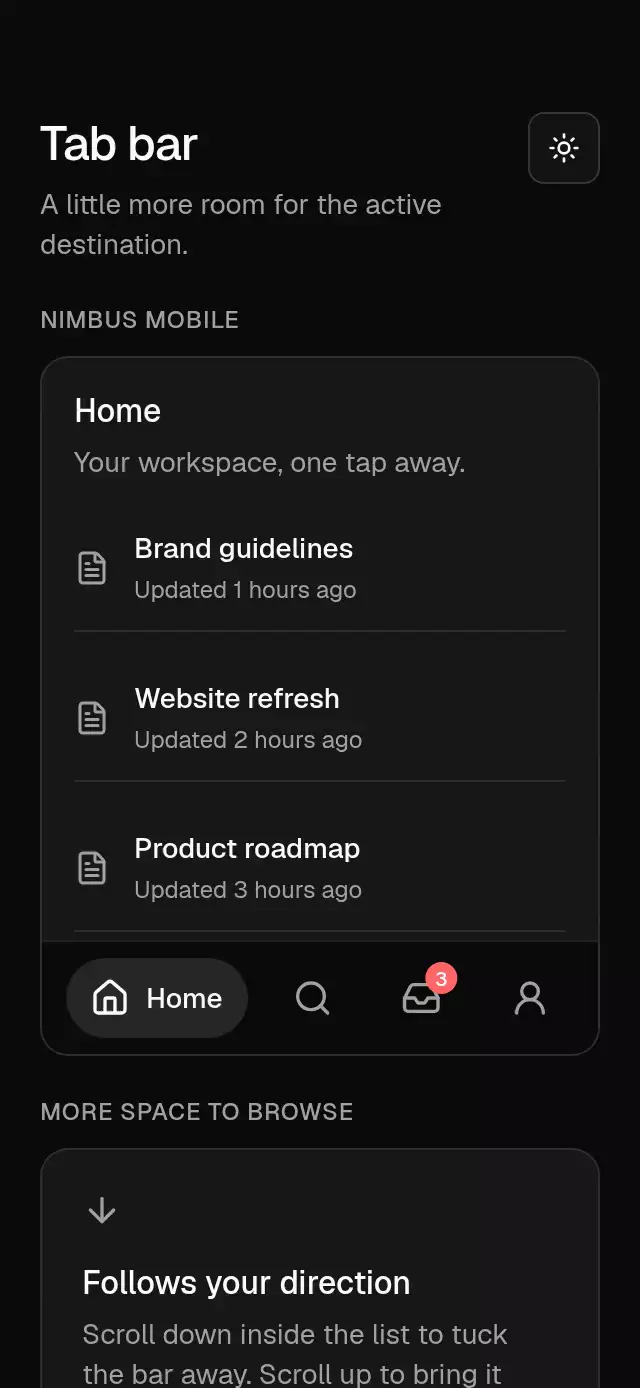
import Animated, {
  ReduceMotion,
  useAnimatedReaction,
  useAnimatedStyle,
  type SharedValue,
  useSharedValue,
  withSpring,
} from 'react-native-reanimated';
import {
  baseActivationProps,
  useBaseReducedMotion,
  spring,
  useBaseTheme,
  type BaseTheme,
} from '../base-theme';
import React, { useEffect, useState } from 'react';
import {
  Platform,
  Text,
  View,
  type StyleProp,
  type ViewStyle,
} from 'react-native';
import { Gesture, GestureDetector } from 'react-native-gesture-handler';
import { scheduleOnRN } from 'react-native-worklets';

// Web only: no browser focus outline; the item highlight shows focus instead.
const NO_WEB_OUTLINE =
  Platform.OS === 'web' ? ({ outlineStyle: 'none' } as object) : null;

type TabFrame = { x: number; width: number };
type TabLayout = TabFrame & { value: string };

export type BaseTabBarItem = {
  /** Current controlled value. */
  value: string;
  /** Visible label. */
  label: string;
  /** Caller-supplied icon or icon renderer. */
  icon: (props: { color: string; size: number }) => React.ReactNode;
  /** Optional unread count shown over the icon. */
  badge?: number;
};
export type BaseTabBarProps = {
  /** Available actions or navigation destinations. */
  items: BaseTabBarItem[];
  /** Current controlled value. */
  value: string;
  /** Called after an enabled choice is activated. */
  onValueChange: (value: string) => void;
  /** Safe-area bottom inset supplied by the host. */
  bottomInset?: number;
  /** Hides navigation below its parent and disables interaction. */
  hidden?: boolean;
  /** Overrides the nearest BaseThemeProvider. */
  theme?: BaseTheme;
  /** Style applied to the container. */
  style?: StyleProp<ViewStyle>;
  /** Stable identifier for the root or trigger. */
  testID?: string;
};
export function BaseTabBar({
  items,
  value,
  onValueChange,
  bottomInset = 0,
  hidden = false,
  theme: override,
  style,
  testID = 'base-tab-bar',
}: BaseTabBarProps) {
  const theme = useBaseTheme(override);
  const reduced = useBaseReducedMotion();
  const [labelWidths, setLabelWidths] = useState<Record<string, number>>({});
  const [contentWidth, setContentWidth] = useState(0);
  const [barHeight, setBarHeight] = useState(56 + bottomInset);
  const frames = useSharedValue<Record<string, TabFrame>>({});
  const x = useSharedValue(0);
  const pillWidth = useSharedValue(0);
  const offset = useSharedValue(0);
  const selectedIndex = items.findIndex((item) => item.value === value);
  const labelWidth = Math.min(
    labelWidths[value] ?? 0,
    Math.max(0, contentWidth - items.length * 44 - 8),
  );
  const extraWidth = selectedIndex < 0 ? 0 : labelWidth + 8;
  const gap =
    items.length > 1
      ? Math.max(
          0,
          (contentWidth - items.length * 44 - extraWidth) / (items.length - 1),
        )
      : 0;
  const targetX = Math.max(0, selectedIndex) * (44 + gap);
  const targetWidth = selectedIndex < 0 ? 0 : 44 + extraWidth;
  const layouts: TabLayout[] = items.map((item, index) => ({
    value: item.value,
    x:
      index * (44 + gap) +
      (index > selectedIndex && selectedIndex >= 0 ? extraWidth : 0),
    width: 44 + (index === selectedIndex ? extraWidth : 0),
  }));
  useEffect(() => {
    x.set(reduced ? targetX : withSpring(targetX, spring(theme, 'selection')));
    pillWidth.set(
      reduced
        ? targetWidth
        : withSpring(targetWidth, spring(theme, 'selection')),
    );
  }, [targetX, targetWidth, reduced, theme, x, pillWidth]);
  useEffect(() => {
    const next = hidden ? barHeight + 8 : 0;
    offset.set(
      reduced
        ? next
        : withSpring(next, {
            reduceMotion: ReduceMotion.Never,
            stiffness: 300,
            damping: 35,
            mass: 1,
          }),
    );
  }, [hidden, barHeight, reduced, offset]);
  const pillStyle = useAnimatedStyle(() => ({
    width: pillWidth.get(),
    transform: [{ translateX: x.get() }],
  }));
  const barStyle = useAnimatedStyle(() => ({
    transform: [{ translateY: offset.get() }],
  }));
  return (
    <Animated.View
      testID={testID}
      aria-hidden={hidden}
      accessibilityElementsHidden={hidden}
      importantForAccessibility={hidden ? 'no-hide-descendants' : 'auto'}
      pointerEvents={hidden ? 'none' : 'auto'}
      onLayout={(event) => setBarHeight(event.nativeEvent.layout.height)}
      style={[
        {
          backgroundColor: theme.colors.background,
          borderTopWidth: 1,
          borderColor: theme.colors.border,
          paddingTop: 8,
          paddingBottom: 8 + bottomInset,
          paddingHorizontal: 12,
        },
        style,
        barStyle,
      ]}
    >
      <View
        role="tablist"
        onLayout={(event) => setContentWidth(event.nativeEvent.layout.width)}
        style={{
          // Include the full target in the native parent's bounds.
          height: 48,
          marginVertical: -4,
        }}
      >
        <Animated.View
          pointerEvents="none"
          style={[
            {
              position: 'absolute',
              top: 4,
              height: 40,
              borderRadius: theme.radius.full,
              backgroundColor: theme.colors.secondary,
            },
            pillStyle,
          ]}
        />
        {items.map((item, index) => (
          <Tab
            key={item.value}
            item={item}
            selected={item.value === value}
            onSelect={() => onValueChange(item.value)}
            theme={theme}
            testID={`${testID}-tab-${item.value}`}
            x={
              index * (44 + gap) +
              (index > selectedIndex && selectedIndex >= 0 ? extraWidth : 0)
            }
            labelWidth={Math.min(
              labelWidths[item.value] ?? 0,
              Math.max(0, contentWidth - items.length * 44 - 8),
            )}
            measurementWidth={contentWidth}
            frames={frames}
            layouts={layouts}
            index={index}
            onLabelWidth={(measured) =>
              setLabelWidths((current) =>
                current[item.value] === measured
                  ? current
                  : { ...current, [item.value]: measured },
              )
            }
          />
        ))}
      </View>
    </Animated.View>
  );
}
function Tab({
  item,
  selected,
  onSelect,
  theme,
  testID,
  x,
  labelWidth,
  measurementWidth,
  frames,
  layouts,
  index,
  onLabelWidth,
}: {
  item: BaseTabBarItem;
  selected: boolean;
  onSelect: () => void;
  theme: BaseTheme;
  testID: string;
  x: number;
  labelWidth: number;
  measurementWidth: number;
  frames: SharedValue<Record<string, TabFrame>>;
  layouts: TabLayout[];
  index: number;
  onLabelWidth: (width: number) => void;
}) {
  const reduced = useBaseReducedMotion();
  const itemValue = item.value;
  const position = useSharedValue(x);
  useEffect(() => {
    position.set(reduced ? x : withSpring(x, spring(theme, 'selection')));
  }, [x, reduced, theme, position]);
  const reveal = useSharedValue(selected ? 1 : 0);
  const press = useSharedValue(1);
  useEffect(() => {
    reveal.set(
      reduced
        ? Number(selected)
        : withSpring(Number(selected), spring(theme, 'selection')),
    );
  }, [selected, reduced, theme, reveal]);
  const labelStyle = useAnimatedStyle(() => ({
    width: (labelWidth + 8) * Math.max(0, reveal.get()),
    opacity: Math.max(0, Math.min(1, reveal.get())),
  }));
  useAnimatedReaction(
    () => ({
      x: position.get(),
      width: 44 + (labelWidth + 8) * Math.max(0, reveal.get()),
    }),
    (frame) => {
      frames.modify((current) => {
        'worklet';
        current[itemValue] = frame;
        return current;
      });
    },
    Platform.OS === 'web'
      ? [itemValue, labelWidth, position, reveal]
      : undefined,
  );
  const minimumTargetWidth = Platform.OS === 'ios' ? 44 : 48;
  const targetStyle = useAnimatedStyle(() => {
    const current = frames.get();
    const minimum = Math.min(
      minimumTargetWidth,
      measurementWidth / layouts.length,
    );
    let left = 0;
    let right = measurementWidth;
    // Every target computes the same ordered boundaries from the live drawings.
    // Reserve the platform minimum for neighbors when the host is narrow.
    for (let boundary = 1; boundary < layouts.length; boundary++) {
      const previous = layouts[boundary - 1];
      const next = layouts[boundary];
      const before = current[previous.value] ?? previous;
      const after = current[next.value] ?? next;
      const midpoint = (before.x + before.width + after.x) / 2;
      const edge = Math.min(
        measurementWidth - (layouts.length - boundary) * minimum,
        Math.max(left + minimum, midpoint),
      );
      if (boundary === index + 1) {
        right = edge;
        break;
      }
      left = edge;
    }
    return {
      width: Math.max(0, right - left),
      transform: [{ translateX: left }],
    };
  });
  const pressStyle = useAnimatedStyle(() => ({
    width: 44 + (labelWidth + 8) * Math.max(0, reveal.get()),
    transform: [{ translateX: position.get() }, { scale: press.get() }],
  }));
  const tap = Gesture.Tap()
    .onBegin(() => {
      press.set(reduced ? 1 : withSpring(0.97, spring(theme, 'press')));
    })
    .onFinalize(() => {
      press.set(reduced ? 1 : withSpring(1, spring(theme, 'press')));
    })
    .onEnd((_event, success) => {
      if (success) scheduleOnRN(onSelect);
    });
  const textStyle = {
    fontFamily: theme.fonts.medium,
    fontSize: 14,
    color: theme.colors.foreground,
  };
  return (
    <>
      <Animated.View
        pointerEvents="none"
        aria-hidden
        accessibilityElementsHidden
        importantForAccessibility="no-hide-descendants"
        style={[
          {
            // Keep the drawing independent of the transparent touch target.
            position: 'absolute',
            left: 0,
            top: 0,
            minWidth: 44,
            minHeight: 48,
            paddingHorizontal: 12,
            flexDirection: 'row',
            alignItems: 'center',
            justifyContent: 'center',
          },
          pressStyle,
        ]}
      >
        <View style={{ width: 20, height: 20 }}>
          {item.icon({
            size: 20,
            color: selected
              ? theme.colors.foreground
              : theme.colors.mutedForeground,
          })}
          {item.badge != null && item.badge > 0 ? (
            <View
              style={{
                position: 'absolute',
                right: -8,
                top: -8,
                minWidth: 16,
                height: 16,
                paddingHorizontal: 2,
                borderRadius: theme.radius.full,
                backgroundColor: theme.colors.destructive,
                alignItems: 'center',
                justifyContent: 'center',
              }}
            >
              <Text
                style={{
                  fontFamily: theme.fonts.medium,
                  fontSize: 10,
                  color: '#ffffff',
                }}
              >
                {Math.min(item.badge, 99)}
              </Text>
            </View>
          ) : null}
        </View>
        <Animated.View style={[{ overflow: 'hidden' }, labelStyle]}>
          <Text numberOfLines={1} style={[textStyle, { paddingLeft: 8 }]}>
            {item.label}
          </Text>
        </Animated.View>
        <View
          pointerEvents="none"
          accessibilityElementsHidden
          importantForAccessibility="no-hide-descendants"
          style={{
            position: 'absolute',
            left: 0,
            top: 0,
            width: measurementWidth,
            opacity: 0,
          }}
        >
          <Text
            accessible={false}
            numberOfLines={1}
            // Rounded up with 1pt of slack: a sub-pixel shortfall makes numberOfLines truncate the label.
            onLayout={(event) =>
              onLabelWidth(Math.ceil(event.nativeEvent.layout.width) + 1)
            }
            style={[textStyle, { alignSelf: 'flex-start' }]}
          >
            {item.label}
          </Text>
        </View>
      </Animated.View>
      <GestureDetector gesture={tap}>
        <Animated.View
          testID={testID}
          accessible
          accessibilityRole="tab"
          accessibilityLabel={
            item.badge ? `${item.label}, ${item.badge} unread` : item.label
          }
          accessibilityState={{ selected }}
          aria-selected={selected}

          {
            /* RN Web forwards DOM events rather than native event objects. */
            ...((Platform.OS === 'web'
              ? {
                  tabIndex: 0,
                  onKeyDown: (event: React.KeyboardEvent) => {
                    if (event.key === 'Enter' || event.key === ' ') {
                      event.preventDefault();
                      onSelect();
                    }
                  },
                }
              : {}) as object)
          }
          {
            /* RN Web forwards DOM events rather than native event objects. */
            ...(baseActivationProps(onSelect, false) as object)
          }
          style={[
            NO_WEB_OUTLINE,
            [
              {
                position: 'absolute',
                left: 0,
                top: 0,
                height: 48,
              },
              targetStyle,
            ],
          ]}
        />
      </GestureDetector>
    </>
  );
}
export default BaseTabBar;